We do not
upload any files to server, hence your data is 100% secure.
Free online svg to pdf converter
Convert svg graphics to pdf for documents and printing
Add files to convert
Added 0 files
Converting files... (0%)
Converted Files
Image
BMP
EPS
GIF
ICO
JPEG
JPG
JFIF
NEF
HEIC
ODD
PNG
PSD
SVG
TGA
TIFF
WebP
Document
DOC
DOCX
PDF
TXT
RTF
Report
CSV
XLS
XLSX
Advanced Options (Optional)
File name:
Image Options
Choose a method if you want to resize the output image.
We will replace the transparent areas of your image with this color. Choose a color using the color picker or enter a hex color value. (eg. #FFFFFF)
Choose a compression method if you want to reduce the output file size.
Convert SVG to PDF for Sharing
Turn multiple SVG artworks into PDFs when the graphic needs to be shared as a document rather than kept only as a web-oriented vector file. This is useful for logos, diagrams, illustrations, charts, and other scalable artwork that needs to be distributed as a PDF. The conversion creates a PDF file from the SVG content instead of simply changing its filename.
Resizer for PDF Output
Control the output dimensions before creating the PDF when the original SVG does not fit the size you need. You can keep the original dimensions or use percentage, width, height, or custom-dimension resizing. This gives you more control when preparing graphics for documents, presentations, or print-related workflows.
Add Background Color to PDF
SVG artwork can contain transparent regions, which may not be desirable in every PDF use case. Choose a background color from the picker or enter a HEX value to give those areas a definite appearance. This can be useful for logos and illustrations that will be placed on a fixed-color document.
Reduce the Size of PDF Files
The converter provides four compression levels: No Compression, Low Compression, Medium Compression, and High Compression. You can choose the level based on whether you want to prioritize image quality or reduce the final file size for sharing, uploading, or storage.
Adjust Orientation and Remove Unwanted Metadata
Auto Orient uses the image’s stored orientation information to help the converted file appear in the correct direction. You can also strip EXIF data, profiles, and comments from the output when that information is not needed. This is useful for removing extra image information before sharing, uploading, or storing the converted files.
Manage Settings and Download the Results
Work on a single SVG when it needs different settings, or apply the same configuration across the entire collection for a consistent workflow. If the adjustments need to be cleared, Reset All Options returns the converter to its default settings. Once the conversion is complete, download a specific PDF individually or use Download All to collect the complete set at once.
Steps to convert SVG to PDF format
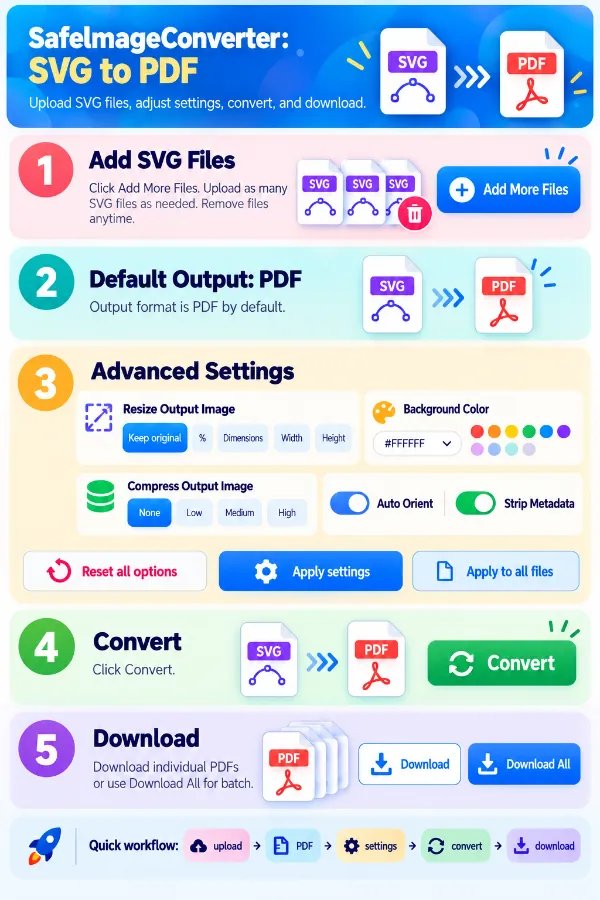
1 . Click Add More Files and select your SVG files.
2 . The tool defaults to PDF as the output format.
3 . Open the settings to adjust the output.
4 . Click the Convert button.
5 . Download the PDF files individually or all.
Other useful information
Explore our visual guides and infographics
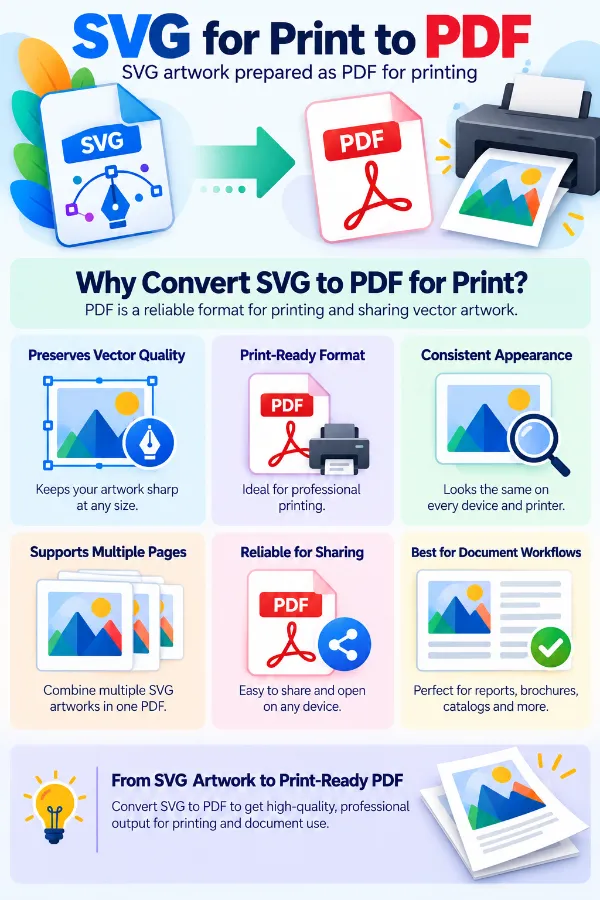
The infographic highlights why pdf can be useful when vector artwork needs to enter a document or print workflow.
The infographic highlights the main features of svg to pdf converter
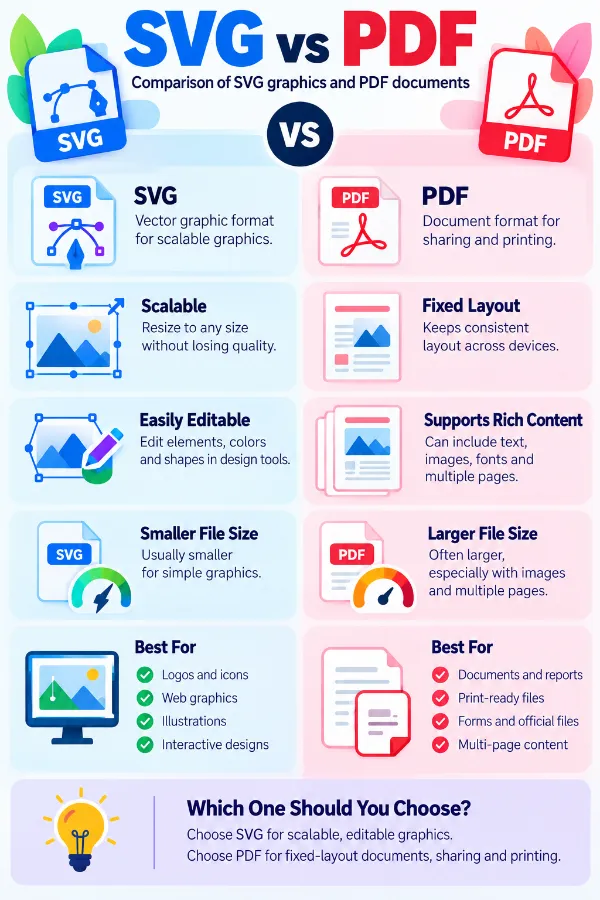
The infographic compares svg and pdf and explains their different roles in graphics and document workflows.
×
Frequently Asked Questions
Why would I convert an SVG to PDF?
SVG is useful for scalable web graphics, logos, and illustrations, while PDF is commonly accepted for documents, printing, submissions, and sharing. Converting the artwork to PDF makes it easier to use in workflows that specifically require a PDF file.
Is SVG to PDF a real file conversion?
Yes. The SVG is processed to produce a PDF file rather than simply changing the file extension. The resulting file has a PDF structure and can be opened with PDF-compatible software.
Where are SVG files commonly converted to PDF?
This can be useful when a logo, diagram, illustration, chart, or other vector graphic needs to be submitted as a PDF. PDFs are also convenient for printing, attaching to documents, and sending artwork to people who may not have an SVG viewer.
Does converting SVG to PDF preserve the vector nature of the artwork?
The conversion is intended to represent the SVG artwork in PDF format, but you should not assume that every SVG feature will remain identical or independently editable. Keep the original SVG when the source artwork needs to be preserved for future editing.
What happens if my SVG contains several separate graphics?
Each uploaded SVG can be processed as its own conversion job. If you have a collection of graphics, processing them together can make it easier to handle the resulting PDF files in one session.
Can an SVG with a transparent background be converted to PDF?
Yes, but transparency can behave differently when artwork is placed into a document-oriented format. If the transparent area is represented against a solid page background, it may appear different in the resulting PDF.
Why is my artwork surrounded by extra whitespace in the PDF?
The SVG may define a canvas or viewBox that is larger than the visible artwork. The PDF can represent that complete area, leaving unused space around the actual graphic.
Why does my graphic occupy only a small part of the PDF page?
The dimensions defined by the SVG may include more space than the visible design. Scaling, the viewBox, and the relationship between the artwork and its canvas can all affect how much of the PDF page the graphic occupies.
What should I do if the PDF cuts off part of my SVG?
A graphic that extends beyond its defined SVG area can be clipped when it is represented in another format. Check that the complete artwork fits within the SVG's canvas before converting it.
Why does text in my SVG sometimes need attention before conversion?
SVG text can depend on the fonts used by the original artwork and the software processing the file. A missing or differently handled font can affect the appearance of text in the PDF.
What happens to SVG animations in a PDF?
SVG can contain animation and interactive behavior, whereas a PDF conversion normally produces a static representation. Animated elements should therefore not be expected to continue playing in the converted document.
Will interactive SVG elements work in the PDF?
Interactive SVG features do not automatically become equivalent PDF interactions. If the SVG depends on scripts, hover behavior, or other web-based interaction, those functions may not be available in the resulting PDF.
Will hyperlinks inside an SVG work after conversion?
An SVG can contain links, but their behavior is not guaranteed to transfer to the PDF in the same way. If clickable links are important, check the converted document rather than assuming the original SVG interaction has been retained.
Why can a very small SVG produce a larger PDF?
SVG can store simple artwork using compact vector instructions. A PDF may contain additional document information needed to represent the artwork, so the converted file can sometimes be considerably larger than the source.
Does SVG file size tell me how large the PDF will be?
A small SVG containing complex effects, embedded resources, or detailed artwork can produce a PDF whose size differs significantly from the original file.
Can I convert an SVG logo for use in a printed document?
Yes. PDF is commonly used when artwork needs to be incorporated into print-ready documents or shared as part of a document package. Check the resulting page size and placement if the logo has strict print dimensions.
Is PDF suitable for submitting an SVG-based design?
PDF can be useful when an organization, website, application, or print service specifically requests PDF instead of SVG. The converted file provides a document-format version of the original graphic.
Can I use an SVG-to-PDF conversion for diagrams and charts?
Yes. Diagrams, charts, technical illustrations, and other vector graphics can be converted when a PDF copy is easier to distribute or include in reports and documents.
What happens if my SVG contains filters, masks, or unusual effects?
Some advanced SVG features may not have a direct equivalent in every PDF rendering workflow. If the design depends heavily on complex effects, inspect the resulting PDF carefully before using it as the final version.
Why might an SVG that works in a browser behave differently in a PDF?
Browsers and PDF conversion systems use different methods to render graphics. An SVG that displays correctly in a browser can therefore require checking after conversion, particularly when it contains advanced effects or unusual styling.
Does an SVG become an editable PDF after conversion?
The resulting PDF should not be treated as a replacement for the original SVG editing workflow. If you need to modify individual vector elements later, retain the original SVG alongside the PDF.
Can I use the converted PDF for printing?
Yes, provided the PDF has the required page dimensions and the artwork is positioned correctly. The final physical output can also depend on printer settings, scaling, paper size, and color handling.
Why is the PDF page size important when converting an SVG?
SVG graphics are not always created with the same document-page requirements as PDFs. If the PDF will be printed or submitted with specific dimensions, the relationship between the SVG canvas and the resulting PDF page becomes important.
What if I need the SVG artwork in several PDF files?
You can process multiple SVG files in the same session and download the resulting PDFs individually or together. This is useful when a collection of separate graphics needs to be converted rather than combined into one document.
Can I upload a PDF file on this tool and get an SVG?
No. This converter is designed for SVG as the source format and PDF as the output. For PDF documents to SVG conversion, use the PDF to SVG converter.
Our USPs
Security
100% (No files are sent to server for processing)
File size limits
None (No limit on size of files)
Usage limits
None (Process as many files as you want)
Price
Free
User Information Captured
None (We do not request for user information such as email / phone number)
Ads
None (We provide complete ad free experience)
Over 100k Users Rely on Our Imageconverter Converter Monthly
Join a growing community of creators who trust safeimageconverter.com for Convert your images to any format online.
We appreciate your feedback and will use it to improve our services.
About The Author
RK Shree - A science enthusiast with a poetic flair, and possesses an insatiable desire to explore diverse fields seeking new knowledge and experiences. My work ethic is highly disciplined and dedicated. I take pleasure in pursuing creative endeavors that captivate me.