We do not
upload any files to server, hence your data is 100% secure.
Png to ico online converter
Change png images into an ico file for icon-based applications.
Add files to convert
Added 0 files
Converting files... (0%)
Converted Files
Image
BMP
EPS
GIF
ICO
JPEG
JPG
JFIF
NEF
HEIC
ODD
PNG
PSD
SVG
TGA
TIFF
WebP
Document
DOC
DOCX
PDF
TXT
RTF
Report
CSV
XLS
XLSX
Advanced Options (Optional)
File name:
Image Options
Choose a method if you want to resize the output image.
We will replace the transparent areas of your image with this color. Choose a color using the color picker or enter a hex color value. (eg. #FFFFFF)
Choose a compression method if you want to reduce the output file size.
Create ICO Files in One Session
Convert PNG images into ICO format when an application or system requires an icon file. Add multiple PNG graphics through Add More Files and process them together instead of starting a separate conversion for each image.
Adjust the Output
Use the available output settings to prepare the ICO according to the requirements of the destination. Options such as resize, add background color, compression, orientation, and metadata handling can be adjusted when they are relevant to the source image.
Apply Settings Where Needed
Apply your selected settings to one PNG file when it needs different treatment from the rest of the collection. Use Apply to All Files when the same setup works for every image, or choose Reset All Options to return to the default settings.
Download ICO Files Your Way
Download a single ICO file when you only need one result from the conversion. Use Download All when you want the complete set of converted icons together. This gives you a simple choice between saving one result and collecting the entire batch.
Free on Any Device
Convert PNG images to ICO without installing desktop software or paying for the conversion. The browser-based tool works on computers, tablets, and mobile devices, so you can use the same converter wherever you need it.
Simple and Secure Conversion
Upload your PNG, choose the required settings, and convert it through a straightforward workflow. The tool keeps the process simple while providing a secure way to handle your image conversion from start to finish.
Steps to Convert PNG to ICO
1 .
Click Add More Files and upload your PNG images.
2 . ICO is selected as the default output format.
3 . Adjust the image settings if needed.
4 . Apply settings to one file or all files.
5 . Click the Convert button to create ICO files.
6 . Download individual ICO files or use Download All.
Other useful information
Explore our visual guides and infographics
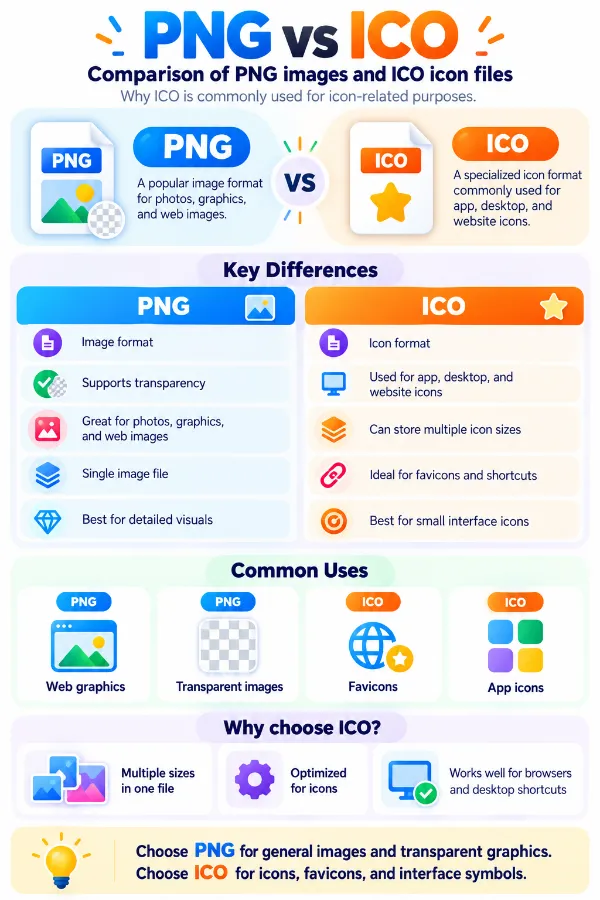
The infographic compares png and ico and explains why ico is commonly used for icon-related purposes.
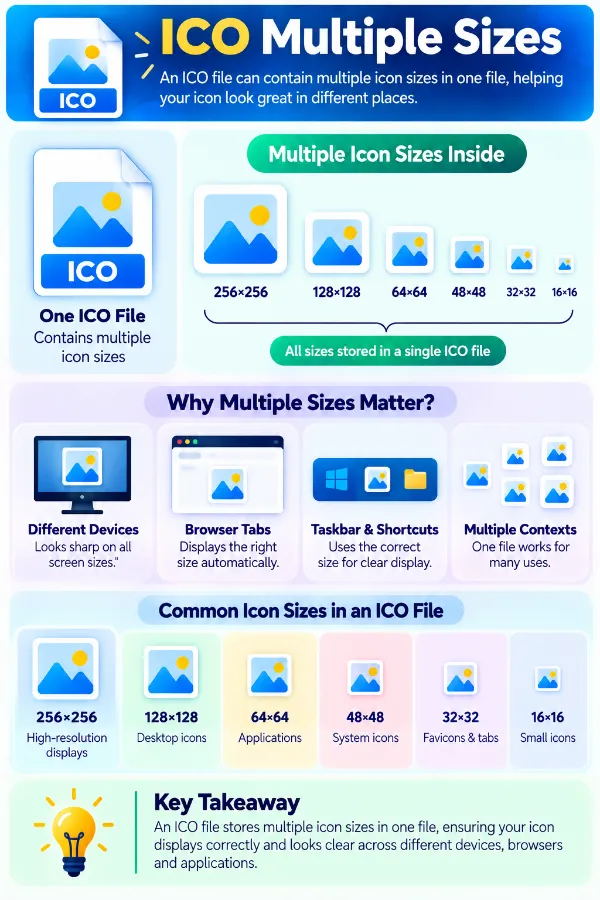
The infographic explains why multiple icon sizes can help an icon display appropriately in different contexts.
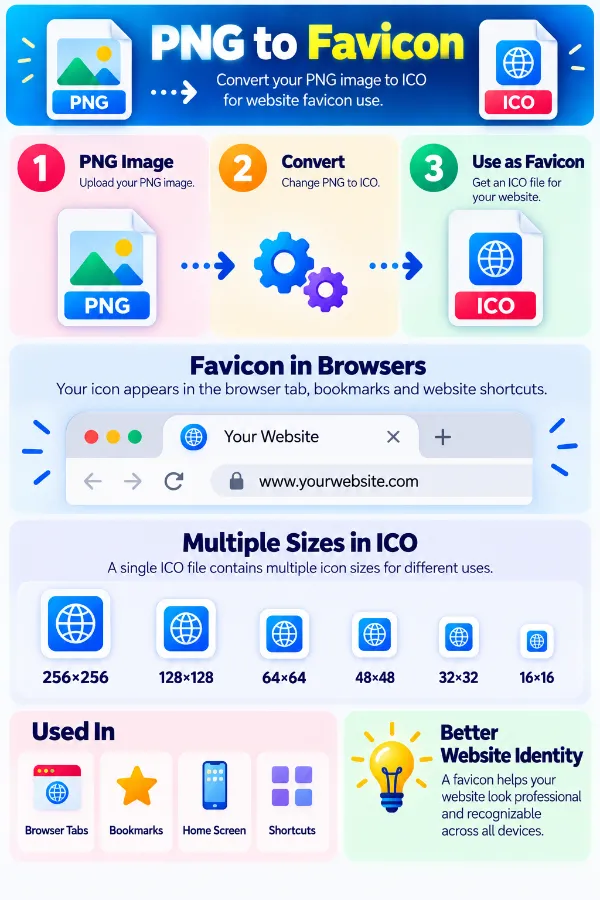
The infographic illustrates how a png image can be converted into an ico file for website icon use.
×
Frequently Asked Questions
What makes an ICO file different from a PNG?
PNG is a general raster image format, while ICO is specifically structured for icon resources. An ICO file can contain multiple icon images at different sizes so software can select a suitable version for the display context.
Can one ICO file contain several icon sizes?
Yes. ICO is designed to store multiple images within one file, such as different versions for small and larger display situations. This is one of the main differences between an ICO file and an ordinary PNG image.
Why are different sizes useful in an ICO file?
An icon may appear in different places and at different display sizes. Providing several versions allows the operating system or application to choose a closer matching image instead of repeatedly scaling one source image.
Does converting PNG to ICO automatically create every icon size?
The available conversion settings determine the output produced by the tool; having an ICO extension does not by itself mean that every possible icon size has been included.
Is ICO mainly associated with Windows icons?
ICO was designed for Windows desktop icons and remains closely associated with Windows application and file icons. It is also encountered in other icon-related workflows, including the historical use of `favicon.ico` for websites.
Can an ICO file contain PNG data?
Yes. Modern ICO files can contain complete PNG images as individual icon entries, particularly for larger icon images. This means PNG is not only a possible source format but can also be part of the internal representation of an ICO file.
Is PNG to ICO just a change of file extension?
No. A valid ICO has its own container structure and includes information describing the icon images stored inside it. Simply renaming `.png` to `.ico` does not create that ICO structure.
Can an ICO contain a normal photograph?
An ICO can contain raster image data, so a photograph can technically be placed into an icon file. However, the usefulness of the result depends on whether the photograph remains recognizable at the small sizes where icons are normally displayed.
Why are square PNGs generally more suitable for ICO conversion?
Icons are normally displayed within square spaces, so a square source makes it easier to maintain a balanced icon shape. A non-square source may require fitting or resizing to work naturally within an icon layout.
What happens to a PNG with an alpha channel in an ICO?
ICO supports transparency information, including 32-bit images with per-pixel alpha in modern Windows icon resources. This allows transparent portions of suitable source artwork to remain useful for icon presentation.
Why can the same ICO appear at different sizes?
The application or operating system may request an icon at a particular display size. If the ICO contains a suitable image entry, the system can select that version rather than treating the file as one fixed-size picture.
Can an ICO be used as a file or application icon?
Yes. ICO is commonly used for Windows application and file icons, including icons displayed by the desktop and File Explorer.
Can an ICO be used as a favicon?
ICO has historically been used for website favicons, including the familiar `favicon.ico` file. However, modern web development also supports other icon formats and methods, so the required format depends on the website implementation.
Why is an ICO be preferable than a PNG?
The destination may require a specific icon resource rather than a general image. ICO also provides a structure for keeping multiple icon sizes together, which a single PNG does not provide in the same way.
Can an ICO be edited like the original PNG?
Not in the same way. The PNG is a standalone raster image, while an ICO can contain a collection of icon images and associated directory information. Editing an individual icon entry may therefore require software that understands the ICO structure.
What happens if an ICO does not contain a suitable size?
The system or application may scale another available icon image to the requested size. Using a closer source size can reduce the amount of scaling required and help maintain the intended appearance.
Does a high-resolution PNG guarantee a good ICO?
No. Resolution alone does not determine whether artwork works well as an icon. The design must remain recognizable at the relatively small sizes in which icons are commonly displayed.
Can detailed illustrations be used as ICO sources?
They can, but the result may be less effective when the icon is displayed small. Artwork with a clear main shape is generally easier to recognize when reduced to icon dimensions.
Is an ICO the same as a cursor file?
No. ICO is the Windows icon format, while CUR is used for cursor resources. The two formats have similarities, but a cursor also contains information that identifies its pointer hotspot.
When is PNG a better choice than ICO?
PNG is usually more appropriate when the destination simply needs a general-purpose raster image. ICO makes more sense when the receiving application, operating system, or icon workflow specifically expects an icon resource.
Does this tool support ICO to PNG conversion?
No. This page only handles PNG to ICO conversion. If your source file is an ICO and you want a PNG image, you will need to use the ICO to PNG converter.
Our USPs
Security
100% (No files are sent to server for processing)
File size limits
None (No limit on size of files)
Usage limits
None (Process as many files as you want)
Price
Free
User Information Captured
None (We do not request for user information such as email / phone number)
Ads
None (We provide complete ad free experience)
Over 100k Users Rely on Our Imageconverter Converter Monthly
Join a growing community of creators who trust safeimageconverter.com for Convert your images to any format online.
We appreciate your feedback and will use it to improve our services.
About The Author
RK Shree - A science enthusiast with a poetic flair, and possesses an insatiable desire to explore diverse fields seeking new knowledge and experiences. My work ethic is highly disciplined and dedicated. I take pleasure in pursuing creative endeavors that captivate me.