close-button
  • Convert to Jpg
  • Convert to Png
  • Convert to Webp
  • Convert to Svg
  • Convert to Tiff
  • Convert To Psd
  • Convert to Nef
  • Convert to Cr2
  • Convert To Heic
  • Convert To Gif
  • Convert To Bmp
  • Convert To Jpeg
  • Convert To Pdf
  • Convert To Ico
  • Convert To Jfif
  • Online jpeg to nef converter

    Create nef-format files from jpeg images instantly

    Add files to convert
    Added 0 files
    Converting files... (0%)
    Converted Files
    Image
    BMP
    EPS
    GIF
    ICO
    JPEG
    JPG
    JFIF
    NEF
    HEIC
    ODD
    PNG
    PSD
    SVG
    TGA
    TIFF
    WebP
    Document
    DOC
    DOCX
    PDF
    TXT
    RTF
    Report
    CSV
    XLS
    XLSX
    Advanced Options (Optional)
    File name:
    Image Options
    Choose a method if you want to resize the output image.
    We will replace the transparent areas of your image with this color. Choose a color using the color picker or enter a hex color value. (eg. #FFFFFF)
    Choose a compression method if you want to reduce the output file size.
    Convert Multiple JPEG Files to NEF
    Convert Multiple JPEG Files to NEF

    Click Add More Files and upload as many JPEG images as you need. You can remove any uploaded file whenever you want before conversion. This makes it practical to process a group of JPEG images in a single session instead of converting each file separately.

    Adjust the Conversion with Advanced Options
    Adjust the Conversion with Advanced Options

    Use the available settings when you want to modify the images before creating the output files. You can resize by percentage, dimensions, width, or height; add a background color; choose compression; correct orientation using EXIF data; and strip profiles, EXIF, and comments. You can also reset all options whenever you want to return the settings to their defaults.

    Apply Changes to One File or the Whole Batch
    Apply Changes to One File or the Whole Batch

    You can adjust an individual JPEG when it needs different treatment from the rest of the files. When the same settings are suitable for the entire collection, use Apply to All Files to handle them together. This gives you control over individual images while still making batch processing quick.

    Simple Conversion Process
    Simple Conversion Process

    The conversion process is simple: upload your JPEG files, adjust the available options if needed, and click Convert. NEF is selected as the default output format on this page, so there is no need to choose it before every conversion. Once processing is complete, you can download the resulting files individually or all at once.

    Choose Another Output Format
    Choose Another Output Format

    NEF is the default output format, but you can change it when you need a different result. The converter supports image formats such as BMP, EPS, GIF, ICO, JPEG, JPG, JFIF, HEIC, PNG, PSD, SVG, TGA, TIFF, and WebP, along with supported document and report formats. This allows you to use the same uploaded JPEG files for other conversion needs without leaving the tool.

    Free, Fast, and Secure on Any Device
    Free, Fast, and Secure on Any Device

    Use the converter on a computer, tablet, or mobile device without installing desktop software. The tool provides a quick browser-based conversion workflow, and your JPEG files are processed without being sent to a server. It is a free and convenient way to convert files while keeping the process on your device.

    idea

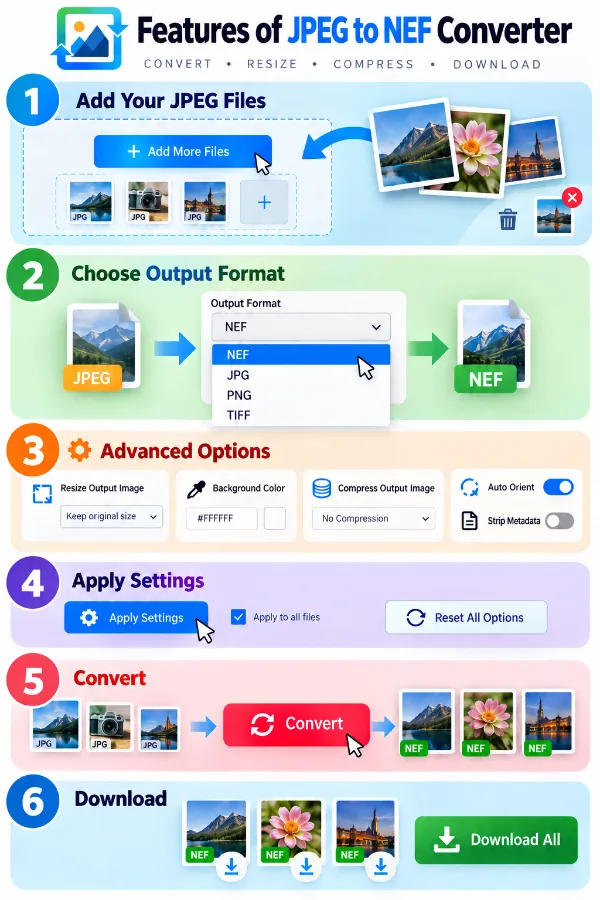
    Steps to convert JPEG to NEF format

    1 . Click Add More Files and select one or more JPEG images.
    2 . NEF is selected as a default output format.
    3 . Open settings to resize, compress, orient, or clean the output.
    4 . Use Apply Settings for one file or for all.
    5 . Click the Convert button and wait for the process to finish.
    6 . Download each NEF file or download the complete batch.

    Other useful information

    Explore our visual guides and infographics
    ×
    Infographic Preview

    Frequently Asked Questions


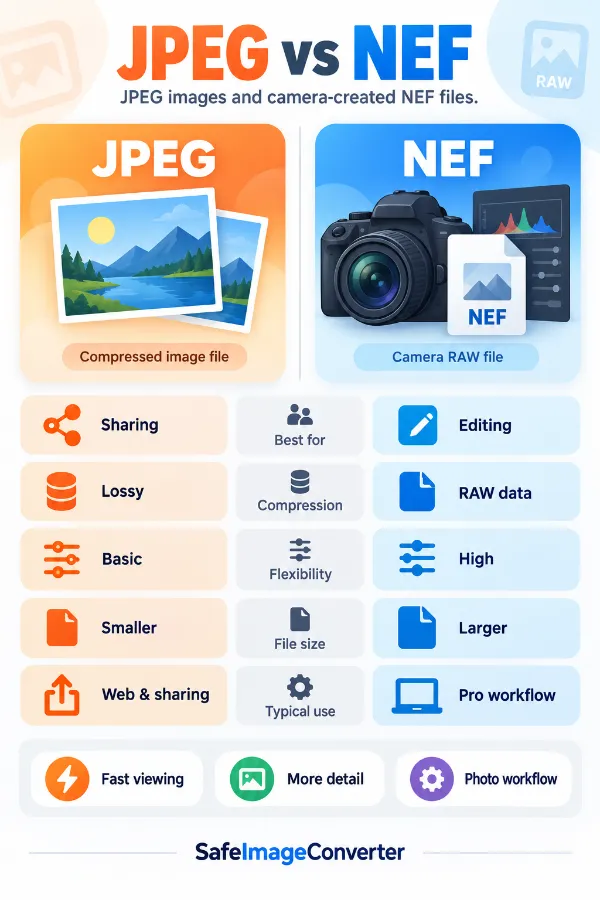
    What is the difference between JPEG and NEF?

    JPEG is a processed image format commonly used for sharing, viewing, and everyday photography. NEF is Nikon's RAW image format, designed to retain camera-captured image data for further processing.

    Why convert JPEG to NEF?

    JPEG to NEF conversion may be useful when a workflow specifically requires a NEF-formatted file. However, the resulting NEF is created from the existing JPEG image and should not be treated as an original Nikon RAW capture.

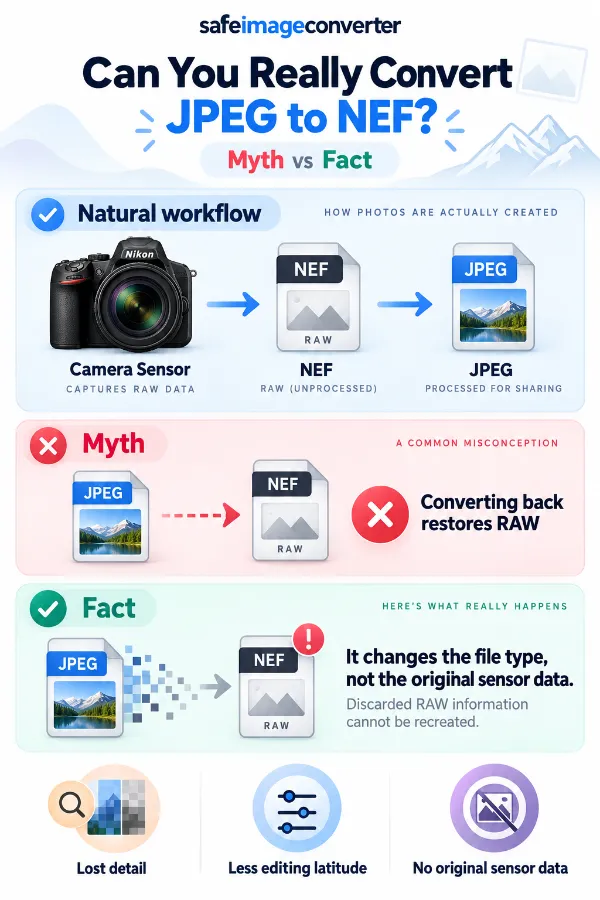
    Can JPEG to NEF restore the original RAW data?

    No. Once a camera has produced a JPEG, information that was discarded or processed during JPEG creation cannot be recovered simply by converting the file to NEF.

    Will a converted NEF have the same editing flexibility as a camera-created NEF?

    No. A native NEF contains RAW capture information that a JPEG does not retain. Converting the JPEG to NEF changes the output format but does not recreate the missing camera data.

    Why does my converted NEF still look like the original JPEG?

    The JPEG provides the actual image content used for the conversion. Changing the output format does not create a new photograph or restore image information that was previously removed.

    Can converting JPEG to NEF recover the original camera exposure settings?

    No. Converting the image cannot reconstruct the original sensor-level exposure information. Some metadata may still exist in the JPEG, but that is different from recovering the camera's original RAW data.

    Why doesn't the converted NEF contain more image detail?

    The conversion starts with the pixels available in the JPEG. If detail was already lost through processing, resizing, or JPEG compression, changing the format cannot bring that missing information back.

    Is a converted NEF suitable for RAW editing?

    It depends on the application and the purpose of the workflow, but it should not be assumed to behave like a native Nikon RAW file. The converted file is based on JPEG image data rather than the camera's original sensor data.

    Why does a RAW editing program reject a converted NEF?

    RAW applications can expect specific camera-generated structures and data inside a NEF file. An ``extension alone does not guarantee that every RAW-processing application will recognize the file as a native camera RAW.

    Can I open a converted NEF in Nikon software?

    Compatibility can vary because Nikon software may distinguish between native camera-created NEF files and files produced through other workflows. Test the converted file in the software you intend to use before relying on it for a particular project.

    Is JPEG to NEF useful for an old photograph?

    It can be useful when a NEF-formatted copy is required and the original camera file is no longer available. The JPEG remains the source, so the conversion cannot restore the image data that existed only in the original RAW capture.

    Why do the converted NEF have a different file size from the JPEG?

    JPEG and NEF use different file structures and store image information differently. The output size can also be affected by the conversion settings and the amount of information included in the resulting file.

    Can a JPEG with heavy compression be converted to NEF?

    Yes, but the JPEG's existing compression remains relevant to the resulting image. Converting it to NEF does not undo JPEG compression or restore detail that was lost before conversion.

    Can resizing a JPEG affect the resulting NEF?

    Yes. If the image is resized before conversion, the NEF output will be based on the resulting dimensions. Reducing the JPEG first means the converted file contains fewer pixels than the original source.

    Can a JPEG be converted to NEF without changing its dimensions?

    Yes, when the original size is retained during preparation. In that case, the conversion uses the existing pixel dimensions rather than intentionally resizing the image.

    Why do JPEG and NEFs show slightly different colors?

    The formats and applications handling them can interpret image and color information differently. A converted NEF is still based on the already processed JPEG, so it should be checked in the application where it will ultimately be used.

    What happens to JPEG metadata during JPEG to NEF conversion?

    Metadata is separate from the visible image itself and may be handled differently during conversion. If you choose to strip metadata, profiles, EXIF information, and comments can be removed from the image during processing.

    Can removing metadata affect the converted NEF?

    Yes. If useful camera information, color profiles, comments, or other embedded data are removed during processing, that information may no longer be available in the resulting file.

    Does a JPEG contain the same camera information as a NEF?

    No. A JPEG may contain embedded metadata such as EXIF information, but it does not contain all of the original RAW sensor information stored in a native NEF.

    Can a JPEG taken with a Nikon camera be turned back into its original NEF?

    No. The fact that the JPEG came from a Nikon camera does not mean the original RAW data can be reconstructed. Only the original NEF file retains the camera's RAW capture information.

    Can a screenshot or edited JPEG be converted to NEF?

    Yes, if the file is a supported JPEG image. The resulting NEF is still based on the screenshot or edited JPEG rather than the original image or camera RAW capture.

    When is JPEG to NEF actually useful?

    It is mainly useful when a JPEG needs to be supplied in NEF format for a particular workflow or file requirement. It should be understood as a format conversion rather than a method for recovering an original Nikon RAW photograph.

    Can I use this tool to change NEF images into JPEG?

    No. This tool handles JPEG to NEF conversion. For converting NEF images to the more commonly supported JPEG format, use the NEF to JPEG converter.

    Our USPs

    Security 100% (No files are sent to server for processing)
    File size limits None (No limit on size of files)
    Usage limits None (Process as many files as you want)
    Price Free
    User Information Captured None (We do not request for user information such as email / phone number)
    Ads None (We provide complete ad free experience)

    Over 100k Users Rely on Our Imageconverter Converter Monthly

    Join a growing community of creators who trust safeimageconverter.com for Convert your images to any format online.


    Review us on

    rating-img

    Rate this tool

    Your feedback helps us improve our services

    /5   votes

    About The Author

    Rk Shree

    RK Shree - A science enthusiast with a poetic flair, and possesses an insatiable desire to explore diverse fields seeking new knowledge and experiences. My work ethic is highly disciplined and dedicated. I take pleasure in pursuing creative endeavors that captivate me.