close-button
  • Convert to Jpg
  • Convert to Png
  • Convert to Webp
  • Convert to Svg
  • Convert to Tiff
  • Convert To Psd
  • Convert to Nef
  • Convert to Cr2
  • Convert To Heic
  • Convert To Gif
  • Convert To Bmp
  • Convert To Jpeg
  • Convert To Pdf
  • Convert To Ico
  • Convert To Jfif
  • Pdf to gif image converter

    Turn pdf pages to gif images for easy sharing

    Add files to convert
    Added 0 files
    Converting files... (0%)
    Converted Files
    Image
    BMP
    EPS
    GIF
    ICO
    JPEG
    JPG
    JFIF
    NEF
    HEIC
    ODD
    PNG
    PSD
    SVG
    TGA
    TIFF
    WebP
    Document
    DOC
    DOCX
    PDF
    TXT
    RTF
    Report
    CSV
    XLS
    XLSX
    Advanced Options (Optional)
    File name:
    Image Options
    Choose a method if you want to resize the output image.
    We will replace the transparent areas of your image with this color. Choose a color using the color picker or enter a hex color value. (eg. #FFFFFF)
    Choose a compression method if you want to reduce the output file size.
    Conversion of PDF to GIF
    Conversion of PDF to GIF

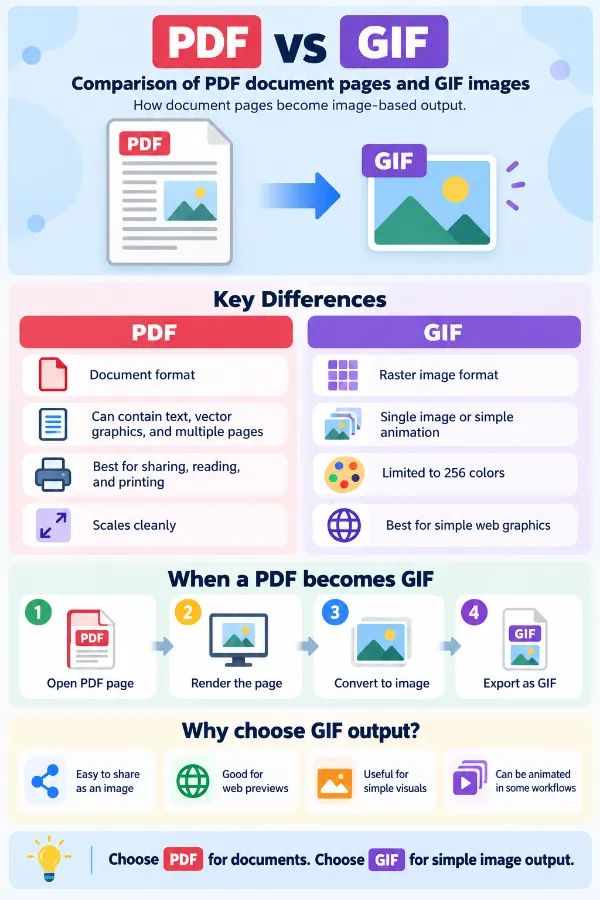
    Turn multiple PDF pages into GIF images when you need page content in an image-based format. This can be useful for sharing a simple page as a graphic, placing a diagram into another project, or using a PDF page where an image file is required. The resulting GIF represents the PDF content as image output rather than keeping it as a document.

    Set the Size and Background
    Set the Size and Background

    Adjust the GIF output using a percentage, exact dimensions, width, or height when the converted page needs to fit a particular screen or design space. You can also choose a background color with the color picker or enter a HEX value when the image needs a defined backdrop. This gives you more control over how the converted PDF page fits into its final layout.

    Optimize the Converted GIF
    Optimize the Converted GIF

    Choose no compression, low, medium, or high compression to control the output file size for sharing, storage, or upload requirements. Auto Orient helps place the converted image in the correct direction using available orientation information, while Strip Metadata removes profiles, EXIF data, and comments that are not needed in the output.

    Apply Settings as Needed
    Apply Settings as Needed

    When several PDFs are added to the batch, you can apply your chosen settings to an individual file or extend them across all files. Reset All Options lets you clear the current adjustments and return to the default settings when you want to start again.

    Download Single or All GIFs
    Download Single or All GIFs

    Download a single converted GIF when you only need a particular result from the batch. When the complete conversion is ready, Download All lets you collect the converted GIF files together instead of saving them one by one.

    Quick and Safe Conversion
    Quick and Safe Conversion

    Convert PDF pages to GIF quickly through a simple browser-based process without a complicated workflow. The tool is designed to provide a safe way to process persona or professional files while making the conversion straightforward.

    idea

    Steps to use the PDF to GIF Converter

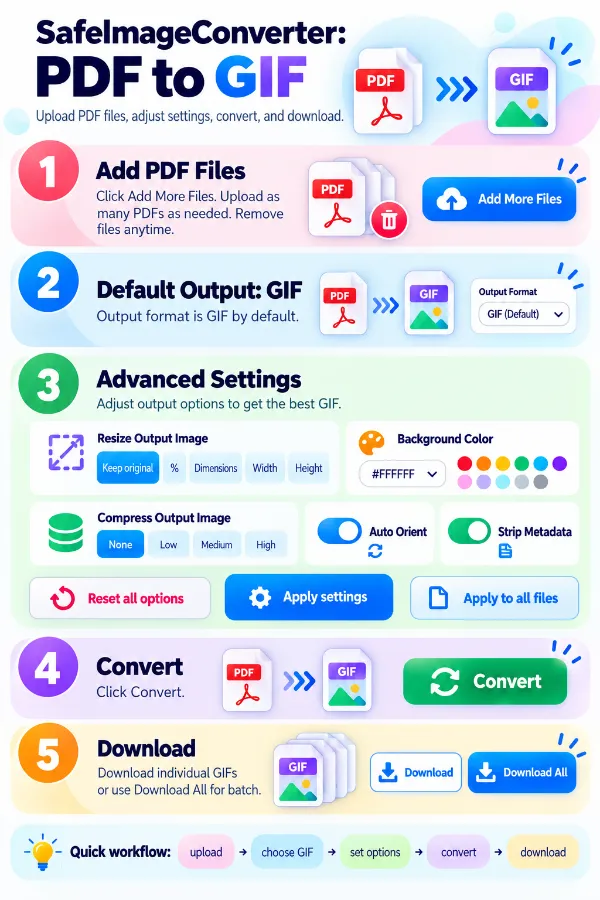
    1 . Click Add More Files and upload your PDF files.
    2 . GIF will be the default output format.
    3 . Adjust the advanced options if required.
    4 . Apply the settings to one file or to all uploaded files.
    5 . Click the Convert button to start the process.
    6 . Download individual GIF files or all.

    Other useful information

    Explore our visual guides and infographics
    ×
    Infographic Preview

    Frequently Asked Questions


    Why would someone convert a PDF to GIF?

    A PDF is designed as a document, while GIF is an image format. Converting can be useful when a PDF page needs to be used as a visual graphic, preview, simple illustration, or image in a system that accepts GIF files.

    What happens to the text when a PDF page becomes a GIF?

    The text becomes part of the image rather than remaining as a separate text layer. It can still be seen in the GIF, but it is no longer available as ordinary selectable document text.

    Can I search for words inside a converted GIF?

    No. GIF stores the page as image pixels rather than a searchable text layer, so normal document search cannot identify individual words within the resulting image.

    What happens to PDF hyperlinks after conversion?

    A PDF can contain clickable links and other document interactions. Once the page is represented as a GIF, those document-level link functions are not retained as interactive PDF elements.

    What happens to PDF bookmarks and document navigation?

    Bookmarks, page navigation, and similar PDF document features belong to the document structure rather than the visible page artwork. They are not carried into a GIF because GIF represents image content rather than a multi-page document structure.

    Can PDF annotations remain editable in a GIF?

    No. Comments, highlights, drawings, and other PDF annotations are document features. After conversion, any visible annotation may simply become part of the image rather than remaining an independently editable PDF object.

    What happens when the PDF contains several pages?

    A PDF can hold multiple pages within one document, whereas a GIF represents image content. The pages therefore need to be represented as image output rather than retained as the original multi-page PDF structure.

    Is GIF suitable for every type of PDF page?

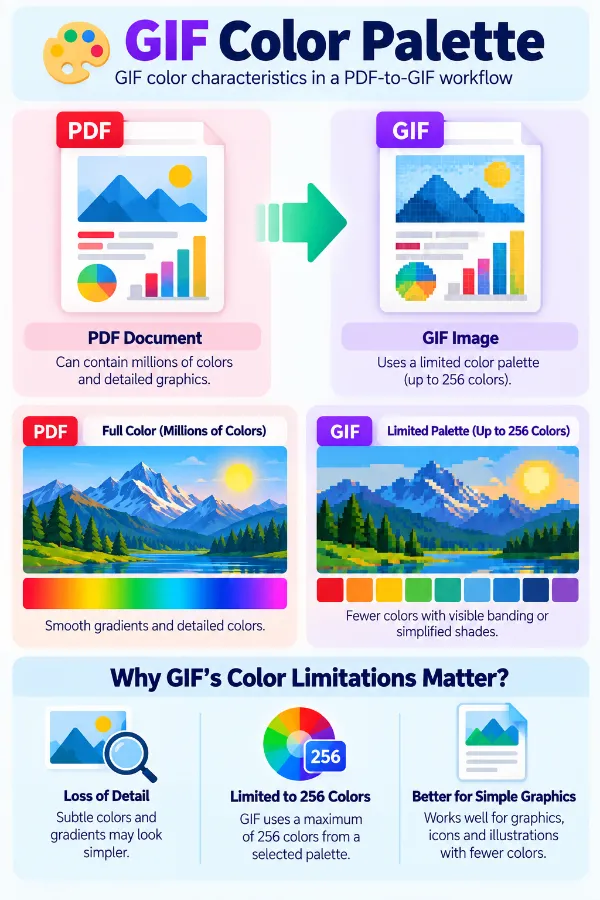
    No. GIF is particularly suited to simpler graphics and images with a limited color range. A PDF containing detailed photographs, complex artwork, or subtle color transitions may be better represented by another image format.

    Why is GIF useful for simple PDF graphics?

    GIF can work well for basic illustrations, diagrams, icons, and other relatively simple visual content. Its indexed-color design makes it more appropriate for certain graphics than for full-color photographic pages.

    Can an animated PDF page become an animated GIF?

    A normal PDF page is not equivalent to an animated GIF. GIF supports multiple frames and simple animation, but converting a static PDF page does not automatically create animation from it.

    What happens to a PDF containing photographs?

    Photographs contain many colors and tonal variations, while GIF uses indexed color with a maximum of 256 colors per palette. This makes GIF less suitable for preserving the full range of photographic content.

    Why can a PDF with gradients not be suitable for GIF?

    Smooth gradients can contain many intermediate shades, while GIF works with a limited indexed color palette. Complex gradients may therefore be less suitable for GIF than simpler graphics.

    What happens to transparent areas in a PDF during conversion?

    Transparency is handled differently across document and image formats. If the PDF contains transparent artwork or areas, the way those regions appear in the resulting GIF depends on how the page is rendered for image output.

    Does converting PDF to GIF preserve the original page size?

    The PDF uses document dimensions, while GIF uses pixel dimensions. The resulting image therefore has its own width and height, which can be adjusted according to how the GIF will be used.

    When should I resize a PDF page before using it as a GIF?

    Resizing is useful when the resulting image needs to fit a specific display area, website space, graphic layout, or upload requirement. A PDF page created for printing may otherwise produce an image much larger than necessary for screen use.

    Why can the GIF file size differ greatly from the PDF?

    The two formats store content in very different ways. A PDF may contain text, vectors, compressed images, and document structures, while the GIF represents the rendered page as raster image data, so their file sizes are not directly comparable.

    Is PDF to GIF useful for website content?

    It can be useful when a simple PDF page or graphic needs to appear as an image rather than requiring visitors to open a PDF document. The suitability depends on the page content and whether GIF's color and image limitations are acceptable.

    Can I use the GIF for a document submission?

    Only if the receiving system accepts GIF and the image format meets its requirements. If the submission specifically asks for PDF, converting the document to GIF would remove important document features and would not be an equivalent replacement.

    When is PNG a better choice than GIF for a converted PDF page?

    PNG is generally more suitable when the page needs more precise color reproduction, detailed graphics, or transparency. GIF is more appropriate for simpler indexed-color graphics and situations where GIF itself is required.

    Does this converter turn GIF to PDF?

    No. Since this tool converts PDF to GIF, you can use the dedicated GIF to PDF converter when you need to convert GIF into PDF documents.

    Our USPs

    Security 100% (No files are sent to server for processing)
    File size limits None (No limit on size of files)
    Usage limits None (Process as many files as you want)
    Price Free
    User Information Captured None (We do not request for user information such as email / phone number)
    Ads None (We provide complete ad free experience)

    Over 100k Users Rely on Our Imageconverter Converter Monthly

    Join a growing community of creators who trust safeimageconverter.com for Convert your images to any format online.


    Review us on

    rating-img

    Rate this tool

    Your feedback helps us improve our services

    /5   votes

    About The Author

    Rk Shree

    RK Shree - A science enthusiast with a poetic flair, and possesses an insatiable desire to explore diverse fields seeking new knowledge and experiences. My work ethic is highly disciplined and dedicated. I take pleasure in pursuing creative endeavors that captivate me.