We do not
upload any files to server, hence your data is 100% secure.
Online jpeg to ico image converter
Turn jpeg artwork to ico format for icon-based uses.
Add files to convert
Added 0 files
Converting files... (0%)
Converted Files
Image
BMP
EPS
GIF
ICO
JPEG
JPG
JFIF
NEF
HEIC
ODD
PNG
PSD
SVG
TGA
TIFF
WebP
Document
DOC
DOCX
PDF
TXT
RTF
Report
CSV
XLS
XLSX
Advanced Options (Optional)
File name:
Image Options
Choose a method if you want to resize the output image.
We will replace the transparent areas of your image with this color. Choose a color using the color picker or enter a hex color value. (eg. #FFFFFF)
Choose a compression method if you want to reduce the output file size.
Convert JPEG to ICO
Turn JPEG images into ICO files directly with the online converter. ICO is useful for icons, favicons, shortcuts, and other icon-based uses. JPEG is set as the source while ICO is available as the default output.
Convert Multiple JPEGs
Add multiple JPEG images to the converter and process them together. You can remove individual files before starting the conversion. Once the conversion is complete, download one ICO file or download all the converted files at once.
Choose Another Output Format
ICO is the default output for JPEG conversion, but you can choose another supported format when needed. Available examples include PNG, JPG, WebP, GIF, TIFF, BMP, PSD, and SVG. This lets you use the same uploaded images for different conversion requirements.
Adjust Image Settings
Prepare your JPEG images with the available conversion settings before creating the output. You can resize the image, add a background color, choose compression, correct its orientation, and manage metadata. These options let you make the required changes during the conversion process instead of using another tool.
Flexible Apply Settings
Settings can be applied to a single JPEG when individual images need different treatment. You can also apply the same settings to multiple files at once when they need identical adjustments, or use Reset All Options to restore the default settings. This gives you flexibility when processing a mixed collection of images.
Works on Any Device
The converter has a simple, user-friendly interface that works across computers, tablets, and mobile devices. Your JPEG images are processed directly in your browser rather than being sent to a server. This provides a safe way to work with images that you do not want uploaded to an external server.
Steps to use the JPEG to ICO Converter
1 . Click Add More Files and upload your JPEG image or images.
2 . ICO is selected as a default output format.
3 . Open settings if the image needs optimization before conversion.
4 . Click the Convert button to process the conversion.
5 . Download the ICO files individually or all together.
Other useful information
Explore our visual guides and infographics
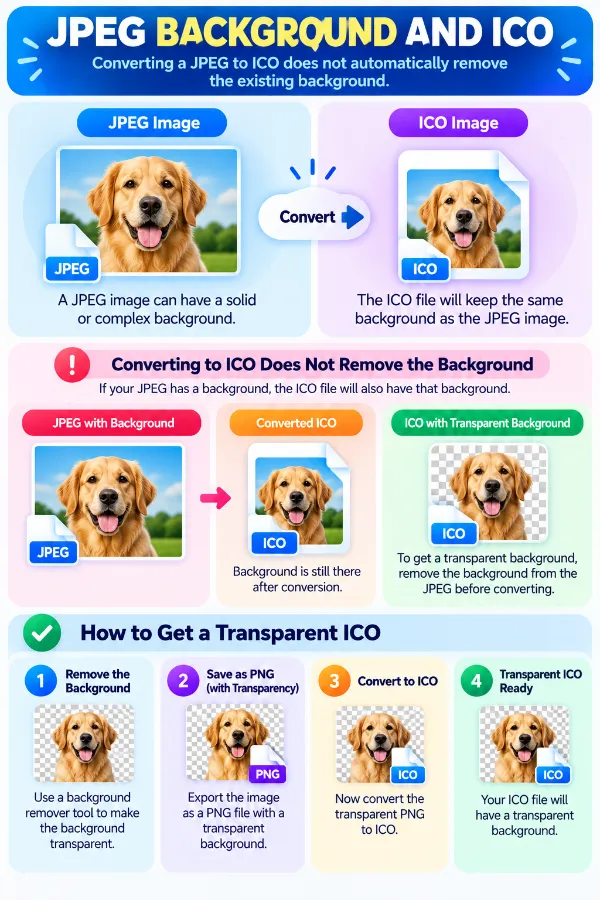
The infographic highlights why converting jpeg to ico does not automatically remove an existing background.
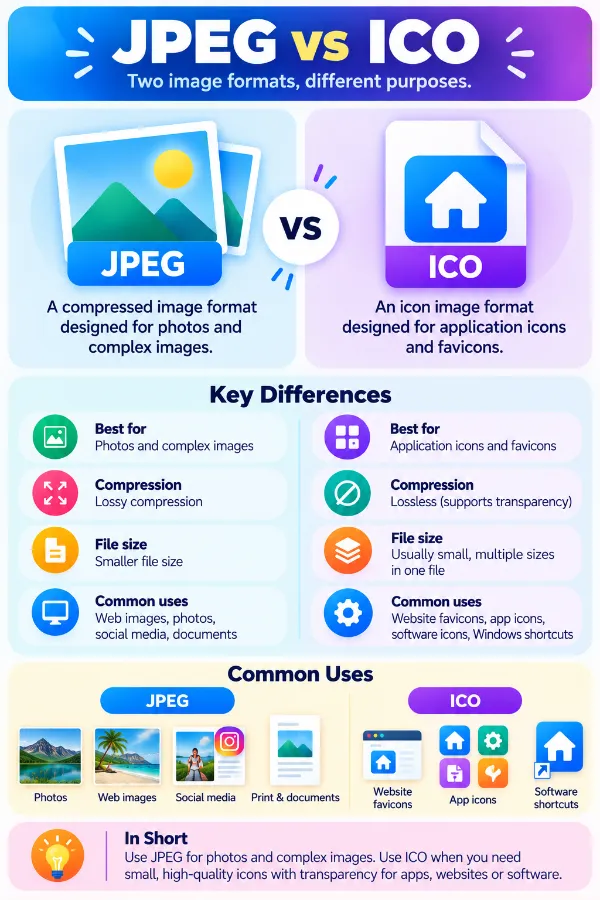
The infographic compares jpeg and ico and explains why ico is designed for icon-oriented uses.
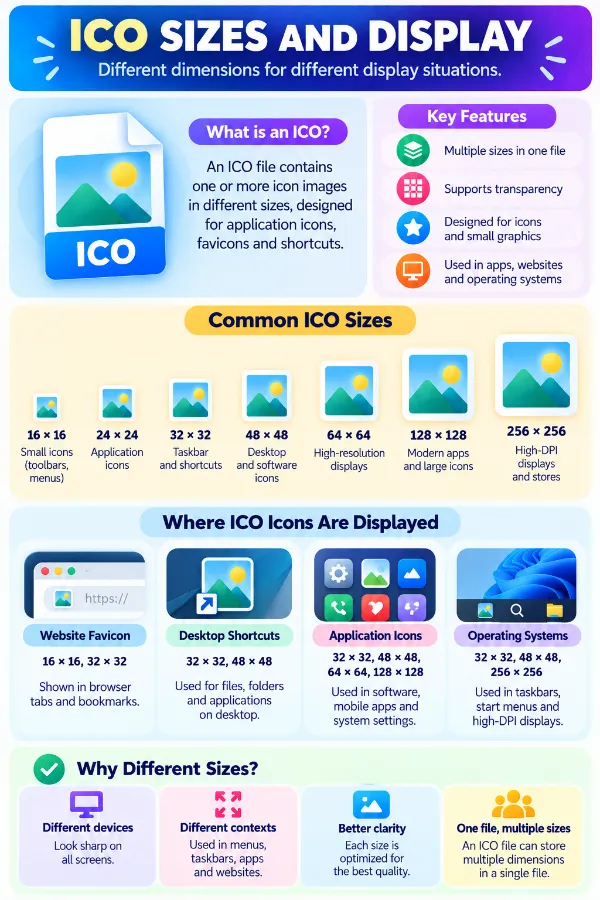
The infographic explains why icons may need different sizes depending on where they are displayed.
×
Frequently Asked Questions
What is an ICO file used for?
ICO is an icon resource format commonly used for application, file, folder, and shortcut icons, particularly in Windows environments. Unlike JPEG, which is primarily used as a general image format, ICO is designed around icon resources.
Why use ICO instead of JPEG for an icon?
JPEG is a general-purpose image format, while ICO is specifically intended for icon resources. An application or operating-system interface may require an ICO file even when the original artwork is available as a JPEG.
Does converting JPEG to ICO make the image a vector?
No. The JPEG is a raster image, and converting it to ICO does not recreate the artwork as vector shapes. The resulting icon remains based on the pixels available in the source image.
Can a JPEG logo be converted into an ICO?
Yes. A JPEG logo can serve as the source for an ICO file, but the conversion does not recover the original editable logo artwork. If the JPEG was exported from a vector design, that original vector structure is not restored by the conversion.
Does an ICO file always contain only one image?
ICO files can contain multiple image representations at different sizes, allowing software to select an appropriate version for the display context. However, what a particular converter creates depends on its ICO-generation process.
Why are multiple icon sizes useful?
An icon may appear in different places and at different display sizes, such as small interface locations or larger desktop views. Having suitable image sizes can reduce the need to enlarge or shrink one image repeatedly.
What icon sizes are commonly used for Windows?
Common Windows icon resources can include sizes such as 16×16, 32×32, 48×48, and 256×256 pixels. The exact sizes needed depend on where the icon will be displayed and the application requirements.
Does a JPEG need to be square before converting it to ICO?
Not necessarily for the conversion itself, but square proportions are important for many icon uses. A rectangular source may need to be prepared appropriately so the important part of the image is not distorted or poorly positioned.
Can a rectangular JPEG become a square ICO?
The source can be resized to suitable dimensions before conversion, but changing its width and height independently can distort the original image. For a logo or recognizable subject, maintaining its proportions is generally important.
Does JPEG to ICO automatically remove the JPEG background?
No. A background that is part of the JPEG image remains part of the source image unless it is specifically changed during image preparation. Converting the format does not identify a background and remove it automatically.
Can a JPEG with a white background be used as an ICO?
Yes, but the white area is part of the JPEG image. If the icon needs a different background appearance, the source needs to be prepared accordingly rather than expecting the conversion itself to identify the white area as removable.
Does ICO support transparent icon areas?
ICO can support transparency, depending on the icon data and how the ICO is created. This is one reason icon files can behave differently from a basic JPEG source, which does not preserve transparent pixels.
Can JPEG transparency be preserved in ICO?
A JPEG does not contain transparent pixels in the way formats such as PNG can. Therefore, converting a JPEG cannot recover transparency that was never present in the source.
What happens to fine details in a JPEG when it becomes an icon?
Fine photographic details may become less useful when the image is displayed at icon dimensions. The smaller the display size, the less space there is for tiny textures, lettering, and other detailed elements to remain distinguishable.
Can a photograph be used as an ICO?
Yes, a photograph can technically be used as the source for an ICO. Whether it makes a useful icon depends on the intended display size and whether the main subject remains recognizable after being reduced.
Why can a JPEG screenshot be a poor ICO source?
A screenshot can contain menus, text, borders, buttons, and other small interface elements. When reduced to icon dimensions, many of these details may become difficult to distinguish.
Can a JPEG icon be used for a Windows application?
An ICO file is commonly used as an application icon in Windows. Whether a particular ICO output meets an application's requirements depends on the icon sizes, color information, transparency, and other requirements expected by that application.
Is ICO the same as a favicon?
ICO is a file format, while a favicon is an icon associated with a website. An ICO file can be used as a favicon, but websites can also use other supported image formats depending on the browser and implementation.
Can JPEG to ICO restore the original icon design?
No. If the JPEG was created by exporting an existing icon or logo, the conversion does not recover the original layers, vector paths, editable shapes, or design elements. It creates an ICO from the available raster image.
Why can a low-resolution JPEG produce a poor ICO?
The converter cannot create genuine image detail that is missing from the source. If the JPEG already has limited resolution or visible artifacts, those limitations can remain noticeable in the resulting icon.
Can a JPEG with text be converted into an ICO?
Yes, but small text can become difficult to read at common icon sizes. Text-heavy artwork is therefore more dependent on the final icon dimensions than a simple symbol or logo.
Is JPEG a good source for every type of ICO?
No. JPEG works as a source when the required artwork already exists as a JPEG, but it may not be ideal for every icon project. A source with transparency, cleaner edges, or higher-resolution artwork may be more appropriate depending on the intended icon.
Can I convert an ICO file into JPEG here?
No. This tool converts JPEG files to ICO format and is not intended for ICO-to-JPEG conversion. For that purpose, use the ICO to JPEG converter.
Our USPs
Security
100% (No files are sent to server for processing)
File size limits
None (No limit on size of files)
Usage limits
None (Process as many files as you want)
Price
Free
User Information Captured
None (We do not request for user information such as email / phone number)
Ads
None (We provide complete ad free experience)
Over 100k Users Rely on Our Imageconverter Converter Monthly
Join a growing community of creators who trust safeimageconverter.com for Convert your images to any format online.
We appreciate your feedback and will use it to improve our services.
About The Author
RK Shree - A science enthusiast with a poetic flair, and possesses an insatiable desire to explore diverse fields seeking new knowledge and experiences. My work ethic is highly disciplined and dedicated. I take pleasure in pursuing creative endeavors that captivate me.