We do not
upload any files to server, hence your data is 100% secure.
Online nef to jpg converter
Turn nikon nef into jpg for easier sharing or uploading
Add files to convert
Added 0 files
Converting files... (0%)
Converted Files
Image
BMP
EPS
GIF
ICO
JPEG
JPG
JFIF
NEF
HEIC
ODD
PNG
PSD
SVG
TGA
TIFF
WebP
Document
DOC
DOCX
PDF
TXT
RTF
Report
CSV
XLS
XLSX
Advanced Options (Optional)
File name:
Image Options
Choose a method if you want to resize the output image.
We will replace the transparent areas of your image with this color. Choose a color using the color picker or enter a hex color value. (eg. #FFFFFF)
Choose a compression method if you want to reduce the output file size.
Turn Nikon RAW Photos Into JPG
NEF files are useful for photography workflows, while JPG is easier to open, share, and upload in everyday situations. This converter lets you process multiple NEF photos together instead of converting each image separately. It is useful when you need JPG copies of several RAW photos for regular viewing, sharing, or uploading.
Advanced Options
The Advanced Options let you control compression, resize the JPG by percentage or specific dimensions, and keep the original size when needed. You can also use Auto Orient to handle stored orientation information and choose a background color for transparent areas. For a cleaner output, you can remove profiles, EXIF data, and comments from the converted JPG.
Choose Preferred Output Format
The converter supports multiple output formats, so you are not limited to JPG when processing NEF files. Select the format that matches your intended use from the available options. This is useful when different projects or applications require different image formats.
Flexible Download Options
After conversion, you can download each processed image separately when you only need a few files. If you have converted several images, you can also download all the results together. This gives you a convenient way to manage both individual and batch conversions.
Apply or Reset Image Settings
Apply your selected options to the files you want to process, or use Apply to All Files when the same settings are needed throughout the batch. If you want to start over, Reset All Options returns the available settings to their defaults. This makes it easier to change or clear your choices before conversion.
Free Conversion with Browser-Based Processing
The converter is free to use, and your selected images are processed directly in your web browser rather than being sent to a server for conversion. This can be useful when working with personal, private, or sensitive images that you prefer to keep on your device. Once you click Convert, the processing starts directly in your browser.
Steps to Convert NEF to JPG
1 . Click Add More Files and choose the NEF photos you want to process.
2 . Change the size, compression, background, orientation, or metadata.
3 . Apply your settings to the selected files or all files.
4 . Click the Convert button to process the NEF images.
5 . Download the JPG files individually or all together.
Other useful information
Explore our visual guides and infographics
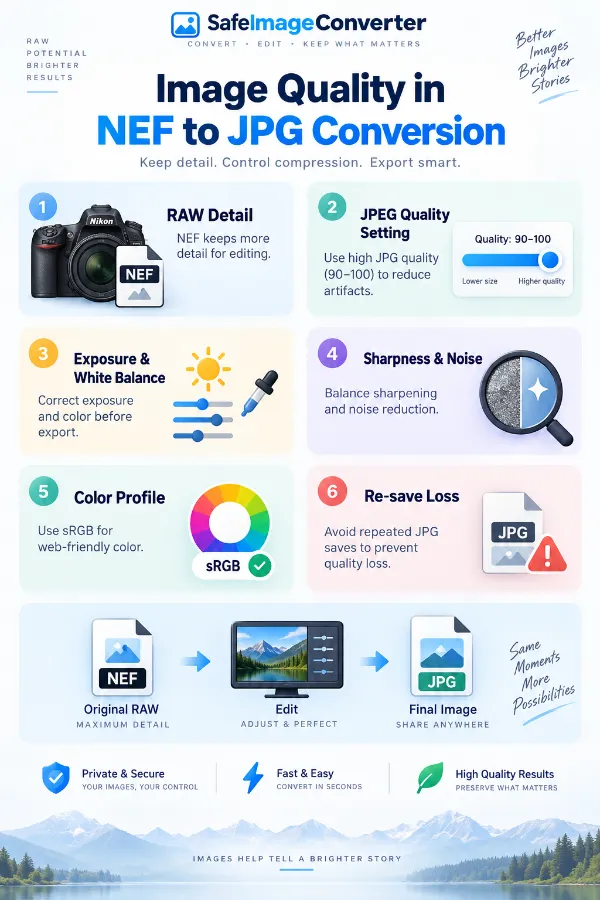
The infographic highlights the main factors that can affect the appearance of a jpg created from a nef file.
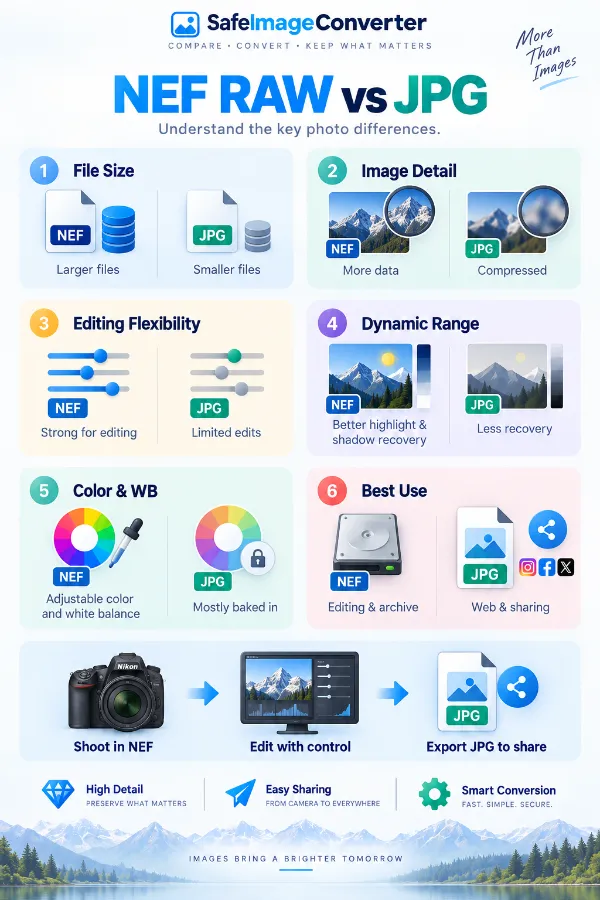
The infographic compares nef and jpg and highlights their different roles in photography workflows.
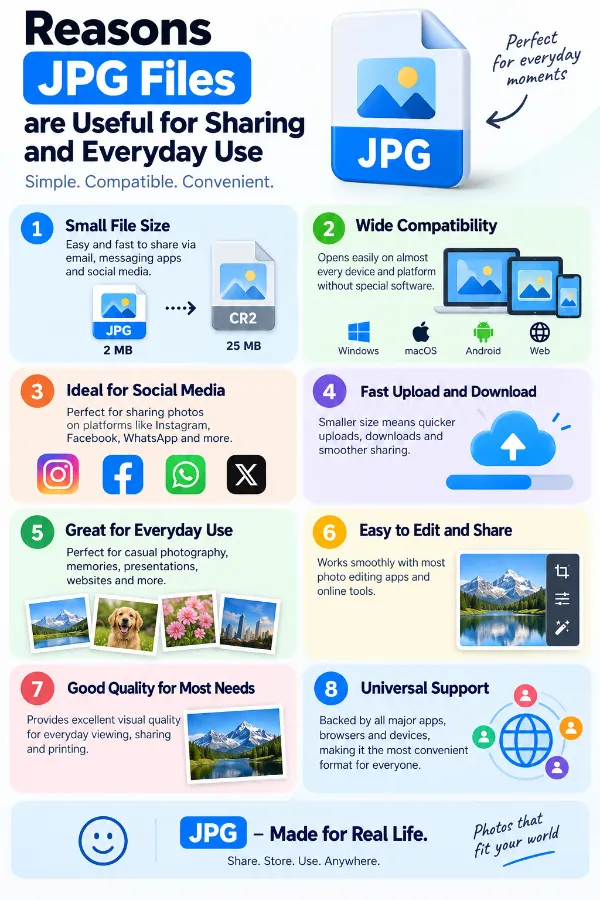
The infographic highlights why jpg is convenient for websites, sharing, storage, and general viewing.
×
Frequently Asked Questions
Why do photographers convert NEF to JPG?
NEF is a camera RAW format, while JPG is a more widely supported finished-image format. Photographers may create JPG copies when they need images for websites, messages, presentations, online forms, or everyday sharing. The NEF can still be retained separately as the original RAW file.
Why is JPG easier to share than NEF?
JPG is supported by most browsers, phones, websites, and everyday image applications. NEF files may require software with support for Nikon RAW formats and may not be accepted by some online services. Converting to JPG makes the photograph easier to use in places that expect a common image format.
What happens to the RAW information when NEF is converted to JPG?
The JPG does not retain the complete RAW capture information contained in the NEF. It represents the photograph as a processed image rather than preserving all of the original sensor data. If the RAW information is important for future editing, the original NEF should be kept.
Why does the converted JPG look different from the NEF?
NEF contains RAW image data that can be interpreted and processed by different RAW applications, while JPG is a rendered image. The conversion process determines how the RAW information is represented in the JPG. Color handling, image processing, and the software used to view each file can therefore result in visible differences.
Why is the JPG file much smaller than the NEF?
NEF files retain extensive camera-captured information, while JPG uses compression to create a more compact finished image. This can make the JPG considerably smaller than the original RAW file. A large reduction in file size is therefore normal during NEF to JPG conversion.
Why does an application accept JPG but not NEF?
Many general-purpose applications and online services support common image formats such as JPG without supporting every camera RAW format. NEF support may depend on the application, operating system, or available RAW processing capabilities. Converting the image to JPG provides a format with broader everyday compatibility.
Why would I resize an NEF while converting it to JPG?
A camera photo may have more pixels than the destination actually requires. Resizing during conversion lets you create a JPG with suitable dimensions for a website, online form, presentation, or other specific use. This avoids having to perform a separate resizing step afterward.
What resize options are available during NEF to JPG conversion?
The output can be resized by percentage, specific dimensions, width, or height. You can also keep the original image size when no dimensional change is required. The appropriate option depends on whether your destination specifies exact dimensions or simply requires a smaller image.
How does compression affect the JPG output?
The converter provides no compression and low, medium, and high compression options. These settings let you choose how much the JPG file size should be reduced during processing. The suitable level depends on whether your priority is a smaller file or retaining more of the available image representation.
Why can two JPG files made from the same NEF have different file sizes?
JPG file size is affected by factors such as image dimensions, image content, and the selected compression setting. A detailed photograph may produce a different file size from an image with large areas of similar color. Changing the resize or compression options can therefore change the final file size.
Why is compression important when preparing JPG images for a website?
Websites and online services may have file-size restrictions or work better with appropriately sized images. Compression can reduce the amount of data that needs to be uploaded and stored. Choosing a suitable setting helps you reduce file size without making the output unsuitable for its intended use.
What does Auto Orient do during NEF to JPG conversion?
Auto Orient uses orientation information stored with the image to help place the photograph in the correct direction. This is useful when the image contains orientation data that indicates how it should be displayed. It can help prevent the resulting JPG from appearing sideways or upside down.
What is EXIF information in a NEF or JPG file?
EXIF is embedded information associated with an image and can include details such as camera settings, capture date, lens information, and orientation. The exact information available depends on the source file and how it was created. This data can be useful for photography workflows but may not be needed in every final JPG.
What happens when EXIF and other metadata are removed?
The converter can remove profiles, EXIF information, and comments from the processed image. This removes the selected embedded information while processing the JPG. If you need a camera or other metadata later, it is better to retain it rather than stripping it from the output.
Why should I remove metadata from a JPG?
A finished JPG may not need the camera information, profiles, or comments carried by the source image. Removing unnecessary embedded information can create a more stripped-down output for a particular workflow. The decision depends on whether that information is useful for the intended use of the image.
How does the background color option work?
The Background Color option lets you choose a color for transparent areas during processing. You can select a color using the color picker or enter a hexadecimal value directly. This gives you control over the appearance of areas that need a defined background in the output.
Why might the JPG need a background color?
A JPG does not preserve transparency as an output feature in the same way as formats that support transparent areas. When transparent portions are involved in the processing workflow, a background color provides a defined appearance for those areas. The selected color can be matched to the intended use of the resulting image.
Why do the colors look different after converting NEF to JPG?
RAW images can be interpreted differently depending on the software and processing used to render them. Converting the NEF to JPG creates a finished image with its own color and image-processing representation. Color profiles and the application used to view the files can also contribute to differences.
How can I convert several NEF photos together?
Use Add More Files to place multiple NEF photos in the conversion list. You can then configure the available image options and process the selected files together instead of repeating the conversion for each photograph. This is useful when a group of images needs the same output treatment.
Can different settings be applied to selected files in a batch?
The available settings can be applied to the files you select in the conversion list. When the same settings are needed for every file, Apply to All Files lets you use those choices across the entire batch. This is useful when one group of photos needs different treatment from the rest.
What happens if NEF photos have different dimensions?
NEF photos in the same batch do not have to begin with identical pixel dimensions. If consistent output dimensions are required, you can use the resize options to set a common size or resizing method. Otherwise, you can keep the original dimensions for each image.
Is NEF to JPG conversion a replacement for keeping the original NEF?
No. The JPG provides a convenient finished-image version, but it does not contain the complete RAW information available in the original NEF. Keeping the NEF is recommended when the photograph may need detailed RAW editing, future processing, or long-term archival use.
Where can I convert JPG files to NEF?
The current tool is to convert NEF files to JPG. To convert JPG images to NEF, visit the JPG to NEF converter.
Our USPs
Security
100% (No files are sent to server for processing)
File size limits
None (No limit on size of files)
Usage limits
None (Process as many files as you want)
Price
Free
User Information Captured
None (We do not request for user information such as email / phone number)
Ads
None (We provide complete ad free experience)
Over 100k Users Rely on Our Imageconverter Converter Monthly
Join a growing community of creators who trust safeimageconverter.com for Convert your images to any format online.
We appreciate your feedback and will use it to improve our services.
About The Author
RK Shree - A science enthusiast with a poetic flair, and possesses an insatiable desire to explore diverse fields seeking new knowledge and experiences. My work ethic is highly disciplined and dedicated. I take pleasure in pursuing creative endeavors that captivate me.