We do not
upload any files to server, hence your data is 100% secure.
Online pdf to tiff converter
Change pdf documents into tiff images easily
Add files to convert
Added 0 files
Converting files... (0%)
Converted Files
Image
BMP
EPS
GIF
ICO
JPEG
JPG
JFIF
NEF
HEIC
ODD
PNG
PSD
SVG
TGA
TIFF
WebP
Document
DOC
DOCX
PDF
TXT
RTF
Report
CSV
XLS
XLSX
Advanced Options (Optional)
File name:
Image Options
Choose a method if you want to resize the output image.
We will replace the transparent areas of your image with this color. Choose a color using the color picker or enter a hex color value. (eg. #FFFFFF)
Choose a compression method if you want to reduce the output file size.
Convert Multiple PDF Files to TIFF
Click Add More Files and upload as many PDF files as you need. You can remove individual files whenever you want before starting the conversion. This makes it easier to convert a collection of PDF files in one session instead of processing them separately.
Optimize the TIFF Output
Use the available advanced settings to prepare the converted TIFF files according to your requirements. You can resize the output by percentage, dimensions, width, or height; add a background color; choose a compression level; correct orientation using EXIF data; and strip profiles, EXIF, and comments. You can apply the settings to one file or use Apply to All Files, and Reset All Options returns the controls to their defaults.
Change the Default Output Format
TIFF is selected as the default output format for the PDF-to-TIFF converter, so you can upload your PDFs and convert them directly. If you need another format, you can select from the supported image, document, or report formats instead. This gives you the flexibility to use the same uploaded PDF files for different conversion requirements.
Simple PDF to TIFF Conversion
The workflow is straightforward: upload your PDF files, adjust the available options if required, and click Convert. You do not need complicated steps to create the TIFF output. The simple interface makes the converter easy to use for both individual files and larger batches.
Download TIFF Files Individually or Together
After conversion, you can download a single TIFF file when you only need one result. For a larger batch, use Download All to save all converted files together. This gives you a convenient way to handle the results without downloading every file separately.
Secure Processing without Server Uploads
Your PDF files are processed directly in your browser, so they are not sent to our server for conversion. You can upload the files you need on your preferred device and convert them without transferring the original documents to a remote server.
Steps to convert PDF to TIFF format
1 . Click Add More Files and upload your PDF file or files.
2 . TIFF is the default output format.
3 . Open settings to optimize the output.
4 . Click Convert and wait for the processing to finish.
5 . Download the TIFF results individually or together.
Other useful information
Explore our visual guides and infographics
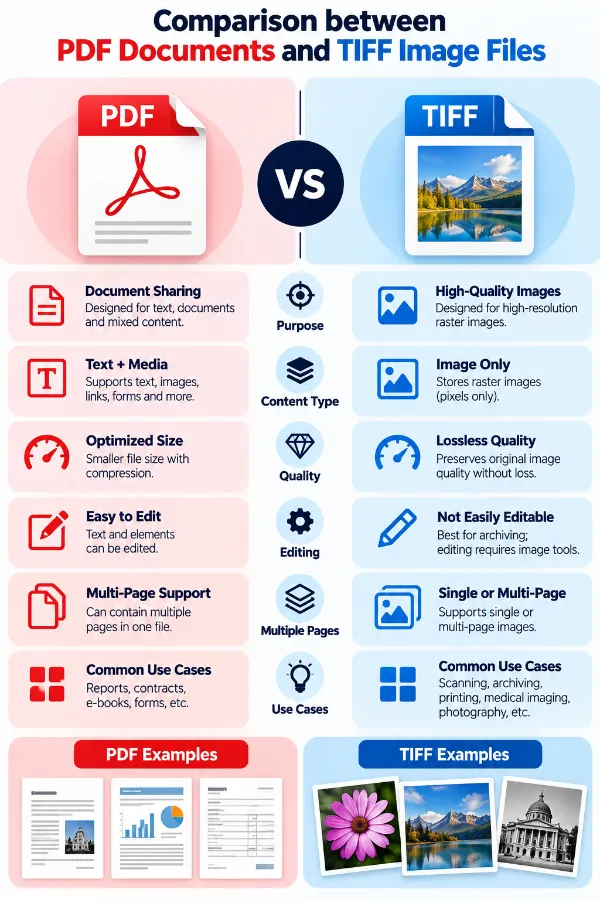
The infographic compares pdf and tiff and shows how a document page becomes raster image data.
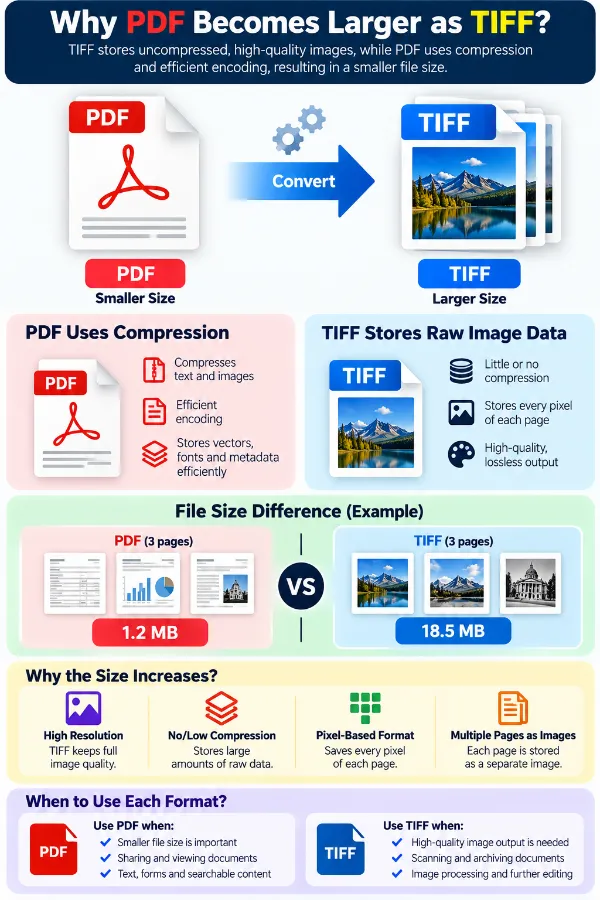
The infographic explains why tiff pages can require more storage than the original pdf.
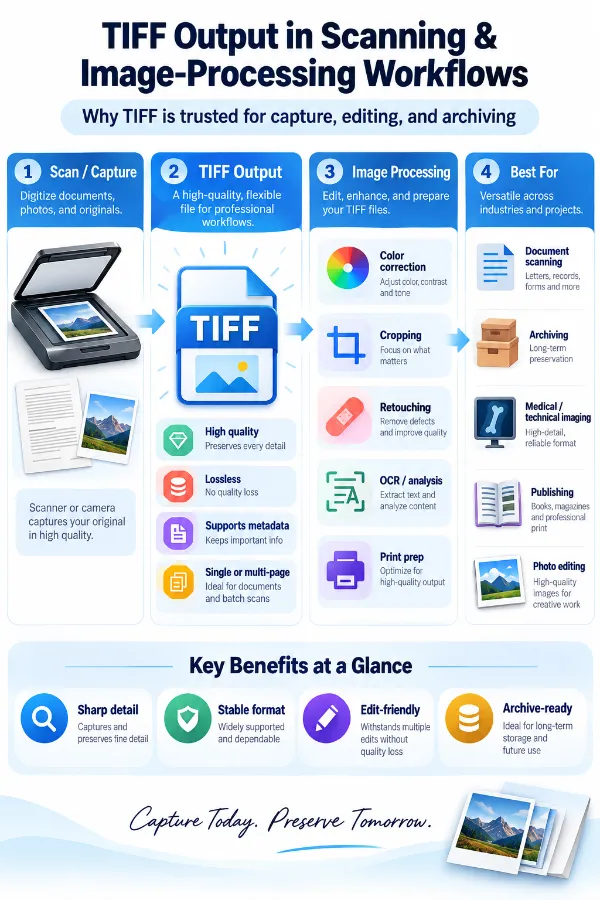
The infographic shows why a raster tiff can be useful when the next workflow expects image data.
×
Frequently Asked Questions
Why should I convert a PDF into TIFF?
TIFF is a raster-image format that can fit printing, scanning, image processing, archiving, and other image-based workflows. Converting the PDF creates an image representation of its pages instead of keeping the original PDF structure.
What is the main difference between a PDF and a TIFF?
PDF is designed for page-based documents and can contain text, vector graphics, images, fonts, and other document elements. TIFF stores raster image data, so a PDF converted to TIFF becomes an image representation of the page.
Does PDF to TIFF keep the text selectable?
No. Text that was selectable in the PDF becomes part of the raster image in the TIFF rather than remaining ordinary selectable text. If you need searchable or selectable text, keep the original PDF.
Can I search for words inside a converted TIFF?
Not in the same way as searching text in a text-based PDF. The converted TIFF contains the page as image data, so text recognition would require a separate OCR process.
Does PDF to TIFF perform OCR?
No. Converting a PDF to TIFF changes the page representation into raster image data; it does not create a new searchable text layer. OCR is a separate process.
What happens to vector graphics in a PDF?
Vector elements are represented as pixels in the TIFF output rather than remaining editable vector objects. This is one of the important differences between the original PDF and the resulting image file.
Will a converted TIFF contain the original PDF layers?
No. PDF content is rendered into the TIFF as image data rather than preserved as separate editable PDF layers or objects.
Can a PDF with photographs be converted to TIFF?
Yes. Photographs contained in the PDF become part of the rasterized TIFF page. Their final appearance depends on the source PDF and how the page is rendered.
What happens to scanned pages during PDF to TIFF conversion?
A scanned PDF page is already largely image-based, so conversion produces a TIFF representation of that page. The result can be useful when another system specifically expects a raster image format.
Can a multi-page PDF be converted to TIFF?
Yes. A multi-page PDF can produce multiple TIFF pages when the conversion preserves the document's page sequence. TIFF supports files containing a sequence of images.
Does every PDF page have to become a separate TIFF file?
TIFF supports multi-page image files, so multiple converted pages can be stored as a sequence within a TIFF rather than requiring one file for every page.
Why can a TIFF be much larger than the original PDF?
A PDF can store text, vectors, and images without rasterizing every page. TIFF represents the rendered page as pixels, which can require substantially more image data, especially for large or detailed pages.
Why can small text look different after conversion?
Small letters have to be represented by pixels in the TIFF. If the rendered image does not contain enough pixels for the fine details, small text can appear less crisp than it did in the original PDF.
Can PDF to TIFF change the page dimensions?
Yes. The TIFF has image dimensions rather than the same document-page structure as the PDF. The output dimensions can therefore be prepared according to the intended image workflow.
Will converting PDF to TIFF improve the original image quality?
No. Conversion changes the representation of the document; it does not create detail that was absent from the source PDF. A low-quality image inside a PDF cannot become a higher-detail source simply because it is converted to TIFF.
Can a high-resolution PDF still produce a large TIFF?
Yes. A page rendered at larger pixel dimensions contains more image data. High-resolution output can therefore require considerably more storage than a lower-resolution version.
Why does a PDF with mostly text create a large TIFF?
The TIFF stores the entire rendered page as pixels, including the areas containing text. A document that was compact as text and page-layout data in PDF form can become much larger once every page is represented as an image.
Does the TIFF keep the original PDF's page layout?
The visual arrangement of the page can be represented in the TIFF, but the underlying PDF structure is not retained. Text, vectors, and other document elements become part of the rendered image.
Can hyperlinks and PDF navigation remain active in TIFF?
No. TIFF is an image format, so interactive PDF features such as clickable links, bookmarks, and document navigation are not carried over as active PDF functions.
What happens to PDF annotations when converting to TIFF?
Annotations that are visible as part of the rendered page can appear as part of the image. They are no longer separate interactive PDF annotations in the TIFF.
Can a PDF form remain fillable after conversion to TIFF?
No. A fillable PDF form depends on document and form structures that are not preserved as interactive fields in a raster TIFF. The visible form can remain as an image, but the fields are not retained as fillable PDF controls.
Why is TIFF be used in an image-processing workflow?
TIFF is specifically designed for raster image data and is supported in workflows involving scanning, publishing, image processing, and other image-oriented tasks. It can therefore be more suitable than a page-layout PDF when the next system expects image data.
When is TIFF more appropriate than PDF for the converted page?
TIFF can be appropriate when the next application or workflow specifically works with raster images, such as certain scanning, imaging, publishing, or image-processing processes. PDF remains more suitable when document structure, searchable text, or page-based features need to be retained.
How to convert TIFF to PDF documents?
You need to use the TIFF to PDF converter for turning the TIFF files into PDF documents.
Our USPs
Security
100% (No files are sent to server for processing)
File size limits
None (No limit on size of files)
Usage limits
None (Process as many files as you want)
Price
Free
User Information Captured
None (We do not request for user information such as email / phone number)
Ads
None (We provide complete ad free experience)
Over 100k Users Rely on Our Imageconverter Converter Monthly
Join a growing community of creators who trust safeimageconverter.com for Convert your images to any format online.
We appreciate your feedback and will use it to improve our services.
About The Author
RK Shree - A science enthusiast with a poetic flair, and possesses an insatiable desire to explore diverse fields seeking new knowledge and experiences. My work ethic is highly disciplined and dedicated. I take pleasure in pursuing creative endeavors that captivate me.