close-button
  • Convert to Jpg
  • Convert to Png
  • Convert to Webp
  • Convert to Svg
  • Convert to Tiff
  • Convert To Psd
  • Convert to Nef
  • Convert to Cr2
  • Convert To Heic
  • Convert To Gif
  • Convert To Bmp
  • Convert To Jpeg
  • Convert To Pdf
  • Convert To Ico
  • Convert To Jfif
  • Online gif to svg converter

    Turn gif images to svg for scalable graphic use

    Add files to convert
    Added 0 files
    Converting files... (0%)
    Converted Files
    Image
    BMP
    EPS
    GIF
    ICO
    JPEG
    JPG
    JFIF
    NEF
    HEIC
    ODD
    PNG
    PSD
    SVG
    TGA
    TIFF
    WebP
    Document
    DOC
    DOCX
    PDF
    TXT
    RTF
    Report
    CSV
    XLS
    XLSX
    Advanced Options (Optional)
    File name:
    Image Options
    Choose a method if you want to resize the output image.
    We will replace the transparent areas of your image with this color. Choose a color using the color picker or enter a hex color value. (eg. #FFFFFF)
    Choose a compression method if you want to reduce the output file size.
    Turn GIF-Based Artwork into SVG Files
    Turn GIF-Based Artwork into SVG Files

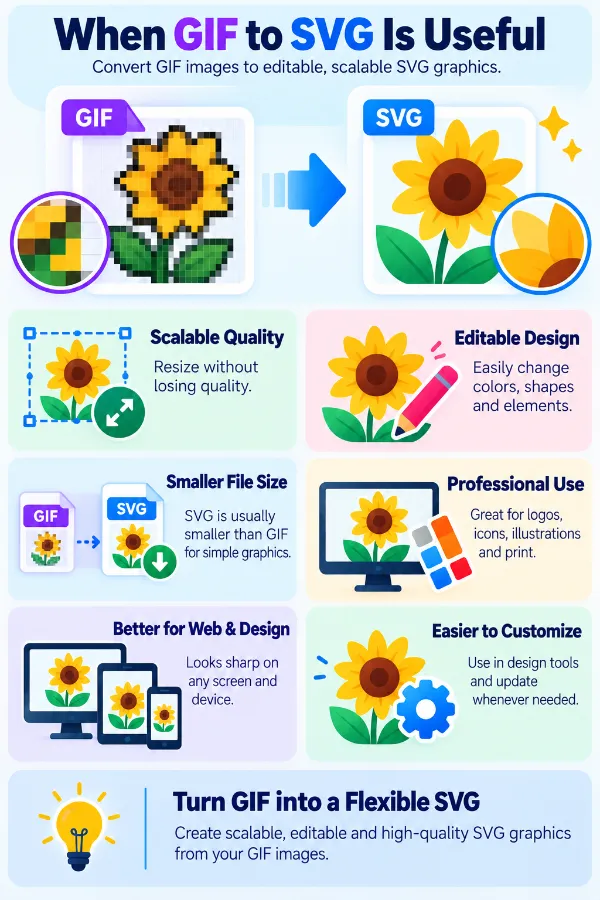
    Create SVG versions of GIF graphics when you need the output in a scalable graphic format for a design or web workflow. This can be useful for simple symbols, icons, logos, and illustrations where SVG is a more suitable format than GIF. The conversion produces a separate SVG file that you can use independently from the original GIF.

    Process a Set of GIFs Together
    Process a Set of GIFs Together

    Use Add More Files to bring several GIF images into the converter during the same session. Instead of repeating the upload and conversion process for every image, you can prepare a group of files together and manage their resulting SVG files in one place.

    Advanced Output Options
    Advanced Output Options

    Adjust the output size using the original dimensions, percentage, exact dimensions, width, or height, and give transparent areas a solid background when needed. You can choose a background color with the color picker or enter a HEX value for a specific shade. Compression, Auto Orient, and metadata removal are also available when you need a smaller, correctly oriented file with unnecessary image information removed.

    Manage Files with Flexible Settings
    Manage Files with Flexible Settings

    A collection of GIFs does not have to follow exactly the same adjustments. You can change settings for an individual file, apply a setup to the entire batch, or use Reset All Options when you want to start the adjustments again.

    Save the SVG Files
    Save the SVG Files

    Download an individual SVG when you only need a particular result from the conversion. When the complete batch is ready, Download All lets you collect the converted files together, making it easier to finish larger GIF-to-SVG jobs.

    Easy and Safe GIF Upload
    Easy and Safe GIF Upload

    Upload GIF files easily from your device using the simple file-upload option. The tool is designed to provide a safe way to process personal or professional graphics without making the upload process complicated. This makes it convenient to work with different types of GIF files whenever you need to convert them to SVG.

    idea

    Steps to Use the GIF to SVG Converter

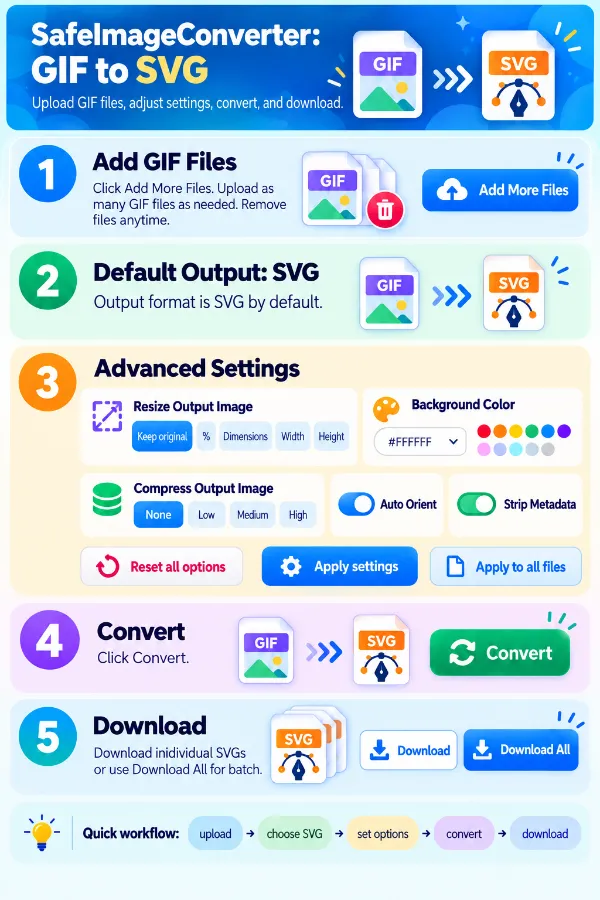
    1 . Click Add More Files and upload the GIF files.
    2 . The tool will automatically default to SVG output.
    3 . Select the available output settings accordingly.
    4 . Apply settings to a single file or use Apply to All Files.
    5 . Click the Convert button.
    6 . Download the SVG files individually or together.

    Other useful information

    Explore our visual guides and infographics
    ×
    Infographic Preview

    Frequently Asked Questions


    Why would I convert a GIF to SVG?

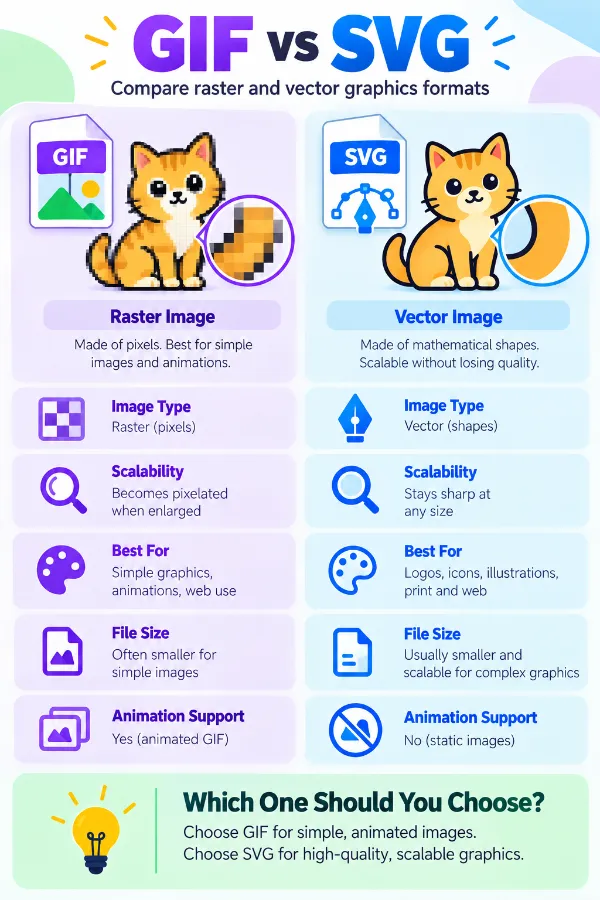
    GIF is a raster format with fixed pixel dimensions, while SVG is intended for scalable graphics. Converting can be useful when a GIF-based logo, icon, symbol, or simple illustration needs to be used in an SVG-based design or web workflow.

    What kind of GIF works best when converting to SVG?

    Static GIFs containing simple logos, icons, symbols, or uncomplicated illustrations are generally more suitable for an SVG workflow. Highly detailed images and animated GIFs may not be as suitable because GIF and SVG handle image content very differently.

    Does a GIF automatically become a true vector after conversion?

    No. A GIF starts as raster artwork made from pixels, and changing its format does not automatically recreate professionally drawn vector paths. The converted SVG should therefore not automatically be treated like an SVG originally created in a vector design program.

    Why is converting a GIF different from converting one vector format to another?

    GIF and SVG use fundamentally different ways of representing images. GIF stores raster image information, whereas SVG is based on a scalable graphic description, so the conversion involves more than simply translating between two similar file structures.

    What happens to an animated GIF during GIF to SVG conversion?

    Animation is one of the major differences between the formats. A GIF can contain multiple frames and timing information, while the converted SVG should not be assumed to retain the original GIF animation in the same form.

    Can I convert an animated GIF when I only need one still image?

    Yes, a GIF can be used as the source for creating a static graphic. If the original contains animation, the resulting SVG should be treated as a static representation rather than expecting the complete animation sequence.

    Can a GIF illustration be used as an SVG on a website?

    An SVG version can be useful in web layouts where scalable graphic artwork is required. The usefulness of the result depends on the nature of the original GIF and whether its artwork translates suitably to the intended web use.

    What happens to the GIF's color limitations after conversion?

    GIF images can use a limited color palette, particularly older or optimized GIFs. Converting the file does not recreate colors or visual detail that were never present in the original source.

    Does GIF transparency remain useful after conversion?

    GIF transparency has its own limitations compared with other image formats. If the source relies on transparent areas, inspect the resulting SVG when placing it over different backgrounds or using it in a design.

    Can I use the converted SVG at a much larger size?

    You can scale an SVG to different display sizes, but conversion does not automatically create detail that was missing from the original GIF. A low-resolution source can therefore remain a limitation even when the output uses SVG.

    Will the converted SVG have editable shapes and paths?

    A GIF does not begin with individual vector objects, so you should not assume that every part of the converted result can be selected and edited as a separate vector shape.

    Can I open the GIF-to-SVG result in a vector editor?

    SVG is supported by many vector-design applications, making it possible to open the converted file in compatible software. The level of editing available will depend on how the GIF content has been represented in the resulting SVG.

    Is GIF to SVG suitable for diagrams and simple symbols?

    It can be useful when an existing GIF version of a simple diagram, symbol, or graphic needs to enter an SVG-based workflow. The source quality and complexity of the artwork still matter when deciding whether the converted result is suitable.

    Why might a GIF not be a good source for an SVG logo?

    A GIF may have been created for a small fixed display size and may already contain pixelation or limited color information. Converting it to SVG does not automatically rebuild the logo as clean geometric artwork.

    Does converting GIF to SVG reduce the file size?

    SVG files can be very compact when they contain simple vector descriptions, but a GIF-to-SVG conversion does not guarantee a smaller file because the output depends on how the source artwork is represented.

    Can I use the SVG version for printing?

    It can be useful for graphics that need to be incorporated into a scalable design or print workflow. However, the quality of the final artwork still depends heavily on the original GIF because conversion cannot recover detail that was absent from the source.

    What types of GIFs are most suitable for conversion to SVG?

    Simple, static graphics such as basic logos, icons, symbols, and uncomplicated illustrations are generally more suitable than complex animated or highly detailed GIFs. The simpler the original artwork, the more practical an SVG-based workflow may be.

    How can I get a GIF from a SVG file?

    You need a converter that uses SVG as the source and GIF as the output. The SVG to GIF converter is intended for this conversion.

    Our USPs

    Security 100% (No files are sent to server for processing)
    File size limits None (No limit on size of files)
    Usage limits None (Process as many files as you want)
    Price Free
    User Information Captured None (We do not request for user information such as email / phone number)
    Ads None (We provide complete ad free experience)

    Over 100k Users Rely on Our Imageconverter Converter Monthly

    Join a growing community of creators who trust safeimageconverter.com for Convert your images to any format online.


    Review us on

    rating-img

    Rate this tool

    Your feedback helps us improve our services

    1.00/5   1 votes

    About The Author

    Rk Shree

    RK Shree - A science enthusiast with a poetic flair, and possesses an insatiable desire to explore diverse fields seeking new knowledge and experiences. My work ethic is highly disciplined and dedicated. I take pleasure in pursuing creative endeavors that captivate me.